> For the complete documentation index, see [llms.txt](https://docs.verifone.com/llms.txt). Markdown versions of documentation pages are available by appending `.md` to page URLs; this page is available as [Markdown](https://docs.verifone.com/adk-os-platform/readme/developing-applications/packaging.md).

# Packaging

VOS3 packages contain a package manifest. Besides name and version of the bundle, the manifest provides options for assigning the bundle to a device users and sub-structuring the bundle into packages.

Each package can then bear attributes for the [User Package Types](#VOS3UsersGuide-UserPackageTypes) and as well as optional group belongings and umask for file permissions.

Optionally, the bundle can bear [User Installation Hooks](#VOS3UsersGuide-UserInstallationHooks) helping with migration tasks during update installations, as well specifying Dependencies to other bundles and Targeting for specific device types or serial numbers only.

## Manifest Structure

The following table describes the structure of VOS3 manifest JSON files applicable for application packages.

{% hint style="warning" %}
the manifest will contain additional fields that are automatically added by the packman packaging tool or are for internal system use only. Please do not delete these fields from the final manifest after creating the package.
{% endhint %}

<table><thead><tr><th>Properties</th><th width="122">Type</th><th width="110">Mandatory</th><th width="354">Description</th><th width="115">Default</th><th>Example</th></tr></thead><tbody><tr><td><strong>BUNDLE INFORMATION</strong></td><td></td><td></td><td></td><td></td><td></td></tr><tr><td>name</td><td>string</td><td>Yes</td><td>Name of the bundle</td><td>--</td><td>"BundleA"</td></tr><tr><td>version</td><td>string</td><td>Yes</td><td>Version of the bundle.</td><td>--</td><td>see <a href="#VOS3UsersGuide-VersionStringFormat">Version String Format</a><br>Example: "1.0.0"</td></tr><tr><td>user</td><td>string</td><td>Yes</td><td>User name, one of: usrX (1-16)</td><td>--</td><td>"usr1"</td></tr><tr><td>software_platforms</td><td><p>array of</p><p>strings</p></td><td>Yes</td><td><p>List of target software platforms to install this bundle to. One of:</p><ul><li>"vos3"</li></ul></td><td>--</td><td>[ "vos3" ]</td></tr><tr><td><strong>PACKAGES</strong></td><td></td><td></td><td></td><td></td><td></td></tr><tr><td>packages</td><td>array of objects</td><td>Yes</td><td>unlimited list of objects</td><td></td><td></td></tr><tr><td>name</td><td>string</td><td>Yes</td><td><p>name of package</p><p>must match package name listed in bundle changeset</p></td><td></td><td>"packageA"</td></tr><tr><td>type</td><td>string</td><td>Yes</td><td>One of available package types, see <a href="#VOS3UsersGuide-UserPackageTypes">User Package Types</a></td><td></td><td>"system_ro"</td></tr><tr><td>group</td><td>string</td><td>No</td><td><ul><li><p>One of available owner groups:</p><ul><li><strong>usrX</strong> (1-16) : private to user</li><li><strong>usrXsys</strong> (1-16) : User applications should use this when sharing files with system applications</li><li><strong>share</strong> : Use this when sharing files with all application and all system users</li><li><strong>users</strong>: Application users should use this group when sharing files with all other application users</li></ul></li></ul></td><td>usrX (1-16)</td><td>"usr1sys"</td></tr><tr><td>umask</td><td>string</td><td>No</td><td>Umask to be applied during installation</td><td>"027"</td><td></td></tr><tr><td><strong>INSTALLATION HOOKS</strong></td><td></td><td></td><td></td><td></td><td></td></tr><tr><td>hook</td><td>object</td><td>No</td><td>One of available package types, see <a href="#VOS3UsersGuide-UserInstallationHooks">User Installation Hooks</a></td><td></td><td></td></tr><tr><td>when</td><td>string</td><td>Yes</td><td><ul><li>"before_dlfile"</li><li>"after_dlfile"</li></ul></td><td></td><td></td></tr><tr><td>executable</td><td>string</td><td>Yes</td><td>Path of executable</td><td></td><td>"patch_config.sh"</td></tr><tr><td><strong>DEPENDENCIES</strong></td><td></td><td></td><td></td><td></td><td></td></tr><tr><td>requires</td><td>array of objects</td><td>No</td><td>once the current dlfile has finished installation, this bundle requires that all listed requirements are met</td><td></td><td></td></tr><tr><td>bundle</td><td>object</td><td>No</td><td>requirement on bundle presence</td><td></td><td>"BundleB"</td></tr><tr><td>name</td><td></td><td>Yes</td><td>name of bundle</td><td></td><td></td></tr><tr><td>version_ranges</td><td>array of objects</td><td>No</td><td>list of version ranges, if absent all versions are assumed</td><td></td><td></td></tr><tr><td>version_start</td><td>string</td><td>Yes</td><td>Lowest version that is allowed (included)</td><td></td><td>use <a href="#VOS3UsersGuide-VersionStringFormat">Version String Format</a><br>Example: "1.0.0"</td></tr><tr><td>version_end</td><td>string</td><td>Yes</td><td>Highest version that is allowed (included)</td><td></td><td>use <a href="#VOS3UsersGuide-VersionStringFormat">Version String Format</a><br>Example: "999.0.0"</td></tr><tr><td><strong>TARGETING</strong></td><td></td><td></td><td></td><td></td><td></td></tr><tr><td>target</td><td>object</td><td>No</td><td>Installs this bundle if it matches at least one of the "include" expressions and none of the "exclude" expressions</td><td></td><td></td></tr><tr><td>include</td><td>object</td><td>No</td><td>If absent, matching all is assumed</td><td></td><td></td></tr><tr><td>devices</td><td>array of strings</td><td>No</td><td>List (union/OR) of regular expressions (<a href="https://www.pcre.org/">pcre</a>) matching device model names (model_num)</td><td>[ "[]" ]</td><td></td></tr><tr><td>dt_names</td><td>array of strings</td><td>No</td><td>List (union/OR) of regular expressions (<a href="https://www.pcre.org/">pcre</a>) matching device tree names (dt_name)</td><td>[ "[]" ]</td><td></td></tr><tr><td>serial_numbers</td><td>array of strings</td><td>No</td><td>List (union/OR) of regular expressions (<a href="https://www.pcre.org/">pcre</a>) matching serial_numbers</td><td>[ "[]" ]</td><td></td></tr><tr><td>exclude</td><td>object</td><td></td><td>If absent, matching none is assumed</td><td></td><td></td></tr><tr><td>devices</td><td>array of strings</td><td>No</td><td>List (union/OR) of regular expressions (<a href="https://www.pcre.org/">pcre</a>) matching device model names (model_num)</td><td>[ "[]" ]</td><td></td></tr><tr><td>dt_names</td><td>array of strings</td><td>No</td><td>List (union/OR) of regular expressions (<a href="https://www.pcre.org/">pcre</a>) matching device tree names (dt_name)</td><td>[ "[]" ]</td><td></td></tr><tr><td>serial_numbers</td><td>array of strings</td><td>No</td><td>List (union/OR) of regular expressions (<a href="https://www.pcre.org/">pcre</a>) matching serial_numbers</td><td>[ "[]" ]</td><td></td></tr></tbody></table>

### User Package Types

Users need to package the applications according to VOS3 installation rules and choose one of the following package types

<table><thead><tr><th>VOS3 package type</th><th>Installation Location</th><th width="149">Users</th><th width="151">Owner groups</th><th width="100">Access</th><th width="114">A/B Support</th><th>Main purpose</th></tr></thead><tbody><tr><td><strong>user_ro</strong></td><td>/home/&#x3C;user>/</td><td>sys_&#x3C;>, usr&#x3C;X></td><td>usr&#x3C;X>, sys_&#x3C;></td><td>RO</td><td>Y</td><td>application read-only executable, libraries, gui resources and other read-only data</td></tr><tr><td><strong>font_ro</strong></td><td>/usr/share/fonts/</td><td>sys_&#x3C;>, usr&#x3C;X></td><td>share</td><td>RO</td><td>Y</td><td>additional fonts</td></tr><tr><td><strong>versioned_data</strong></td><td>/mnt/appdata/versioned/&#x3C;user>/</td><td>usr&#x3C;X></td><td>usr&#x3C;X></td><td>RW</td><td>Y</td><td>private application configuration and assets</td></tr><tr><td><strong>share_users_versioned_data</strong></td><td>/mnt/appdata/versioned/share/</td><td>usr&#x3C;X></td><td>users</td><td>RW</td><td>Y</td><td>shared data between usr&#x3C;X></td></tr><tr><td><strong>share_all_versioned_data</strong></td><td>/mnt/appdata/versioned/globalshare/</td><td>sys_&#x3C;>, usr&#x3C;X></td><td>share</td><td>RW</td><td>Y<br></td><td>shared data between sys_&#x3C;> and usr&#x3C;X></td></tr><tr><td><strong>data</strong></td><td>/mnt/appdata/data/&#x3C;user>/</td><td>usr&#x3C;X></td><td>usr&#x3C;X></td><td>RW</td><td>N</td><td>application non-critical runtime data (large media, etc.)</td></tr><tr><td><strong>user_hook</strong></td><td>&#x3C;tmpfs></td><td>usr&#x3C;X></td><td></td><td>RW</td><td>N/A</td><td>user application plugin to modify RW user data or versioned data</td></tr></tbody></table>

Note that additional VOS3 system package types are provided for system usage only.

### User Installation Hooks

A hook is declared in the bundle manifest file using the "hook".

Hooks are extracted, authenticated and executed in a temporary environment with same permissions as the user's home.

The following library paths will be setup for executable to run in this order:

* Extracted path of executable (.)
* Extracted path "lib" path (./lib)
* Default runtime paths for the user in the active binary read-only partition

The "when" attribute specifies time of execution:

* "before\_dlfile": before the DL file gets installed
* "after\_dlfile": after the DL file got installed

The bundle that declares itself as a hook provides "when" (before / after) and specifies the "executable" that gets run by the installer.

This executable returns an exit code:

* 0: indicates that hook installation performed correctly
  * bundle (hook) is considered as installed
* 1: indicates that hook is not applicable to this platform
  * bundle (hook) is considered as not targeted
  * installation continues
* 2: indicates an error
  * bundle (hook) is considered not installed
  * installation is aborted

### Version String Format

It recommended to follow the semantic of **MAJOR . MINOR . PATCH \[.PATCH\_REVX]** :

* MAJOR version when you make incompatible API changes,
* MINOR version when you add functionality in a backwards compatible manner, and
* PATCH version when you make backwards compatible bug fixes.
* The "PATCH\_REVX" being considered as an extension to the PATCH field.

This versioning is used for:

* Validate/reject version formatting
* Validate/reject dependencies between bundles
* other version checks

{% hint style="info" %}
Packman allows to specify a version extension in alphanumeric format, to add more, usually human readable information to the version string and is not considered for any version checks.
{% endhint %}

### Versioned User Data

As opposed to the "data" location (pointed by "\~/flash"), the current "versioned data" content is backed up when installation takes place.

Typically, the following sequence happens:

1. Install application v1 with usr1 which contains "versioned\_data"
   * versioned\_data content v1
2. Application runs for a while and update its versioned\_data
   * versioned\_data content v1b
3. Install application v2 with usr1 which contains "versioned\_data"
   * versioned\_data content v2
4. Application runs for a while and update its versioned\_data
   * versioned\_data content v2b
5. Fallback (to v1)
   * versioned\_data content v1b

## Package Creation

The package creation tool is called packman. Please refer to the packman user guide for more details.

Here is a sample showing how to create dlfile for single or multiple bundles and merging them:

{% file src="/files/0wjVP9ohDlTQ03GqidyV" %}

### Create Package from bundle directory

To build a DL-file with a bundle use:

```bash
./packman.py build -t vos3 -s dev -i <bundle_dir> -d <dlfile>
```

Where:

* "bundle\_dir" contains manifest.json at its root
* all package directories are at its root
* manifest.json contains bundle name, version, packages with name and types

The packaging process will show errors and warning explaining issues.

Notes:

* the build command accepts several directories by using "-i \<bundle\_dir1> \<bundle\_dir2>" option.
* the build command will issue an error if destination already exists, to overwrite, use "-f" option.

### Create Package from dlfile directory (recursive)

To build a DL-file with multiple bundles use:

```bash
./packman.py build -t vos3 -s dev -r -i <dlfile_dir> -d <dlfile>
```

Where:

* "dlfile\_dir" contains one or more bundle directories
* each "dlfile\_dir/bundle\_dir" contains manifest.json at its root
* each package directory for each bundle is at the root of "dlfile\_dir/bundle\_dir"
* each manifest.json contains bundle name, version, packages with name and types

### Merging several DL-files

To merge the content of several dlfiles into one usr:

```bash
./packman.py merge -t vos3 -s dev -d <dlfile1> <dlfile2>  -o vos3dlfile.tar
```

Example:

```bash
./packman.py merge -t vos3 -s dev -d dl.file1.tar dl.file2.tar  -o dl.allfiles.tar
```

Notes:

* the merge command accepts more than 2 dlfiles in input on the "-d" option
* the merge command will issue an error if destination already exists, to overwrite, use "-f" option: example: ./packman.py merge -t vos3 -s dev -d \<dlfile1>\<dlfile2> -**f**o vos3dlfile.tar

### Validate DL-file

Validation for VOS3 packaging verifies the json schema of manifests and changesets.

It also checks for valid entries, coherency between bundles, etc.

To validate a DL-file use:

```
./packman.py validate -t vos3 -rd <dlfile>
```

### Guidance and examples

All bundles

* must have a meaningful name
* must not have prefix (dl. , bdl. , pkg.)
* should not have postfix
* bundle names should not include version information

All packages

* must be a directory at the root of the CSD file (xxxx.csd.tgz) → automatically done by packman tool

#### **Example 1: structure and manifest**

usr1 application manifest

<details>

<summary><strong>Application bundle manifest</strong></summary>

```json
{
    "name": "bankapp",
    "version": "1.0.1",
    "user": "usr1",
    "software_platforms": ["vos3"],
    "packages": [
        {
            "name": "bankapp",
            "type": "user_ro"
        },
        {
            "name": "bankapp_res",
            "group": "share",
            "type": "user_ro"
        }
    ]
}
```

</details>

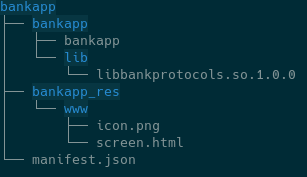
Directory structure:

<div align="left"><img src="https://3462522456-files.gitbook.io/~/files/v0/b/gitbook-x-prod.appspot.com/o/spaces%2FIfFmiYwINerMPYjzrAC6%2Fuploads%2Fgit-blob-7c9adbee3a80b6af9a95bb81222b784a6e1bfdcd%2F14.png?alt=media" alt=""></div>

Build command line:

```bash
packman.py build -t vos3 -s dev -i bankapp -fd dl.bankapp_1.0.1.tar
```

#### **Example 2: manifest for configuration**

usr1 configuration manifest

<details>

<summary><strong>Application bundle manifest</strong></summary>

```json
{
    "name": "bankAconfig",
    "version": "1.0.1",
    "user": "usr1",
    "software_platforms": [
        "vos3"
        ],
    "packages": [{
        "name": "bankA",
        "type": "versioned_data"
        }
    ]
}
```

</details>

### Package Signing

#### Managing signers

By default, if no signer specified in manifest, the signer list in manifest is set to \['SPONSOR'] for customer applications.

#### Development signing

Development signing is done using packman tool as shown above

#### Production signing

Production signing is performed using the Signing Portal. dl files with user bundles use this portal: <https://sign.verifone.com/>

1. Upload the dlfile to the portal
2. Reviewers are alerted by mail that an approval is requested
3. As soon as 2 reviewers have approved, the signature is done
4. Requester receives notification by mail that request was approved
5. Signed dlfile is available for download

Note: the signing portal will only sign / resign bundles that are for the users the signer can sign

### Handling conflicts

A conflict is an attempt to package and install entries (dir, file, symlink) with the same path.

#### Rules

Here are the conflicting rules:

1. **Within one package** of any type, two or more entries of ANY type MUST NOT conflict with each other (this would be a TAR archive with duplicate entries)
2. **Within one bundle**, between two or more packages of same type:
   * two or more entries MUST NOT conflict with each other with only one exception:
     * conflicting entries are directories with same user/group and permissions
3. **Among all applicable bundles** (result of install session on already installed bundles) for READ-ONLY package types (system\_ro, user\_ro, font\_ro, kernel\_ro) :
   * two or more entries MUST NOT conflict with each other with only one exception:
     * conflicting entries are directories with same user/group and permissions

Note: Rules above allow conflicts for Read-write locations in different bundles, the order of installation (see below) will determine the outcome and installing these packages will overwrite any runtime modifications.

#### Verifying rules

**Installer** will detect & reject any attempt to break the above rules and fail the installation.

**Packman** tool will detect & reject any attempt to break the above rules in the scope the dlfiles provided to it.

{% hint style="info" %}
If several dlfiles may be involved in a conflict, an attempt to use the "**merge**" command of packman will **reveal the conflicts during installation**, even if they will be installed separately.
{% endhint %}

### Dependencies

Dependencies are verified for each dlfile at the end of the verification phase.

Here is a example for multiple dlfiles provided for installation in one session:

* Already installed: bundle A
* Installation session (3 dlfiles), verification starts:
  * dlfile 1 : bundle B and C (depends on bundle A and B) → OK
  * dlfile 2 : bundle D (depends on B and E) → ERROR → E is not satisfied
  * dlfile 3 : bundle E (depends on A)

Note: this installation session is rejected and none of the dlfiles are installed (and fallback is kept).

### Targeting vs dependency

#### Definitions

**Targeting**: "manifest rules to check if a valid bundle should be filtered out from installation depending on device characteristics"

**Dependency**: "manifest rules to check if a valid bundle has all required resources to work properly on device, failing installation otherwise"

#### Comparison

<table data-header-hidden><thead><tr><th width="120"></th><th width="441"></th><th width="221"></th><th width="152"></th><th></th></tr></thead><tbody><tr><td></td><td><strong>Criteria type</strong></td><td><strong>Criteria</strong></td><td><strong>Matching action</strong></td><td><strong>Not matching</strong></td></tr><tr><td><strong>Targeting</strong></td><td>Target reference value is always present and immutable</td><td><ul><li>Serial Number</li><li>Device Model</li><li>Device tree name</li></ul></td><td>install bundle</td><td>skip bundle installation</td></tr><tr><td><strong>Dependency</strong></td><td>Dependency reference value can change (or be removed) and be part of the same installation session</td><td><ul><li>Bundle name / version</li><li>Sponsor ID</li></ul></td><td>accept installation</td><td>FAIL</td></tr></tbody></table>

### Installation order

#### Bundle ordering (BO):

1. root
   1. bundle name alphabetic order
2. sys\_<>
   1. bundle name alphabetic order
3. usr (bundle alpha)
   1. bundle name alphabetic order

#### Installation order:

1. Verification of all dlfiles, for each dlfile in provided order:
   1. installer hook
   2. remove bundles (BO)
   3. "before\_dlfile" hooks (BO)
   4. normal bundles (BO)
   5. "after\_dlfile" hooks (BO)
   6. dependency check
2. Installation of all dlfiles, for each dlfile in provided order:
   1. installer hook
   2. remove bundles (BO)
   3. "before\_dlfile" hooks (BO)
   4. normal bundles (BO)
   5. "after\_dlfile" hooks (BO)


---

# Agent Instructions
This documentation is published with GitBook. GitBook is the documentation platform designed so that both humans and AI agents can read, navigate, and reason over technical content effectively. Learn more at gitbook.com.

## Querying This Documentation
If you need additional information that is not directly available in this page, you can query the documentation dynamically by asking a question.

Perform an HTTP GET request on the current page URL with the `ask` query parameter, and the optional `goal` query parameter:

```
GET https://docs.verifone.com/adk-os-platform/readme/developing-applications/packaging.md?ask=<question>&goal=<endgoal>
```

`ask` is the immediate question: it should be specific, self-contained, and written in natural language.
`goal` is optional and describes the broader end goal you are ultimately trying to accomplish on behalf of the user. GitBook uses it to tailor the answer towards what is most useful for that goal.

The response will contain a direct answer to the question and relevant excerpts and sources from the documentation.

Use this mechanism when the answer is not explicitly present in the current page, you need clarification or additional context, or you want to retrieve related documentation sections.