> For the complete documentation index, see [llms.txt](https://docs.verifone.com/llms.txt). Markdown versions of documentation pages are available by appending `.md` to page URLs; this page is available as [Markdown](https://docs.verifone.com/cug-55.02/commander-user-reference-55.02/taxable-rebates.md).
# Taxable Rebates
With the “Taxable Rebate Feature”, a product can now be marketed to the consumer at the discounted price while collecting tax against the amount of the rebate.
## Overview
Tax laws exist that require sales tax to be collected against the amount of the discount when said discount is the result of an agreement between the vendor and merchant that provides for the merchant to be reimbursed for all or part of the discounted amount. Such a scenario is termed a “rebate”.
With the “Taxable Rebate Feature”, a product can now be marketed to the consumer at the discounted price while collecting tax against the amount of the rebate. The price book/PLU file reflects the discounted price, the amount of the rebate is stored separately and the system adds the amount of the rebate to the transaction’s taxable sales total for purposes of calculating tax. Taxable rebates may be applied at the item level when a particular PLU is sold and/or at the promotional level when a particular NAXML promotion requirement is met. A single PLU may participate in multiple rebates in the same transaction regardless of whether rebates are item or promotion-based.
{% hint style="info" %}
*In order to legally increase the tax basis of the transaction without increasing the before-tax subtotal, use of this feature may involve additional requirements such as on-site signage. Compliance with those additional requirements is the responsibility of the merchant and/or enterprise.*
{% endhint %}
## Using Taxable Rebates
The examples provided here assume the following tax definitions:
Tax Description Indicator Rate
State Tax T 7%
County Tax N 1%
City Tax C 2%
Luxury Tax X 5%
### **Taxable Rebate on Single Item**
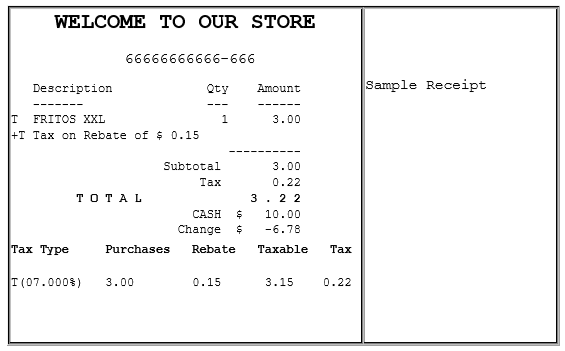
Consumer purchases a single bag of Fritos XXL where a manufacturer rebate of $ 0.15 applies.
Tax Type Purchases Rebate Taxable Tax
T(07.000%) 3.00 0.15 3.15 0.22
### **Taxable Rebate on Multiple Quantity Item**
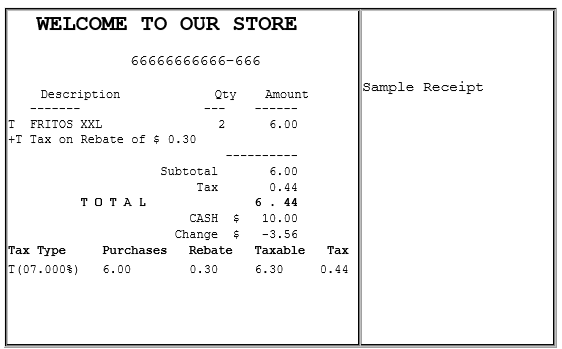
Consumer purchases 2 quantities of Fritos XXL where a manufacturer rebate of $ 0.15 applies to each bag.
**Tax Type Purchases Rebate Taxable Tax**
T(07.000%) 6.00 0.30 6.30 0.44
### **Taxable Rebate on Item and Item in Combo**
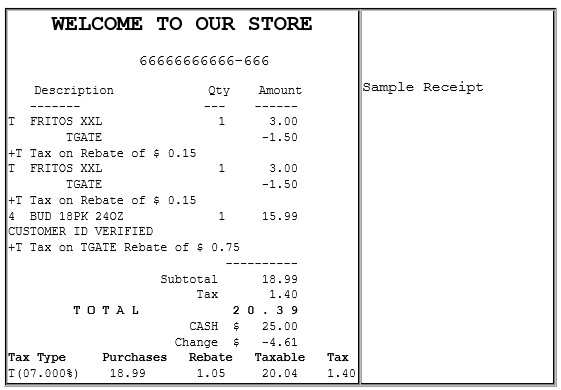
Consumer purchases 2 bags of Fritos XXL plus an 18 PK of 24 oz Bud.
This purchase qualifies as a promotion resulting in a final price of $1.50 for each of the bags of Fritos.
Fritos XXL has an applied rebate of $ 0.15 per bag.
A separate rebate applies to the promo itself where $ 0.75 cents of the discounted amount is a manufacturer rebate.
Applicable rebates = 2 x 0.15 + 0.75 = 1.05
**Tax Type Purchases Rebate Taxable Tax**
T(07.000%) 18.99 1.05 20.04 1.40
### **Taxable Rebate on Multiple Combos**
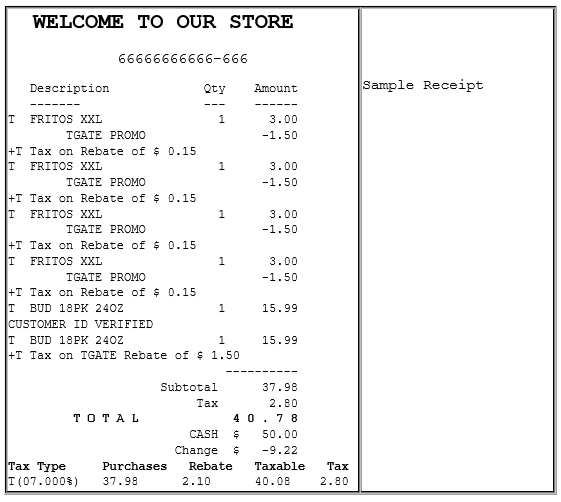
Consumer purchases 4 quantities of Fritos XXL plus 2 quantities 18 PK of Bud.
This purchase qualifies as 2 promotions resulting in a final price of $1.50 for each of the 4 bags of Fritos.
Fritos XXL has an applied rebate of $ 0.15 per bag.
A separate rebate applies to the promotions where $ 0.75 cents of the discounted amount is a manufacturer rebate. Since this purchase has 2 of these combos, the amount of the rebate for the promos is $ 1.50
Applicable rebates = 4 x 0.15 + 2 x 0.75 = 2.10
**Tax Type Purchases Rebate Taxable Tax**
T(07.000%) 37.98 2.10 40.08 2.80
### **Taxable Rebate on Multiple MixMatch**
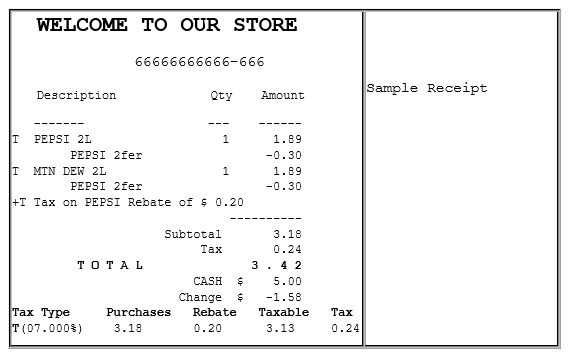
Consumer purchases 2 2L Pepsi products.
When purchased as Pepsi 2fer, items are offered at promotional price of $1.59 and a taxable rebate of $ 0.20 applies to the promo.
**Tax Type Purchases Rebate Taxable Tax**
T(07.000%) 3.18 0.20 3.13 0.24
### **Taxable Rebate on Item, Combo and MixMatch**
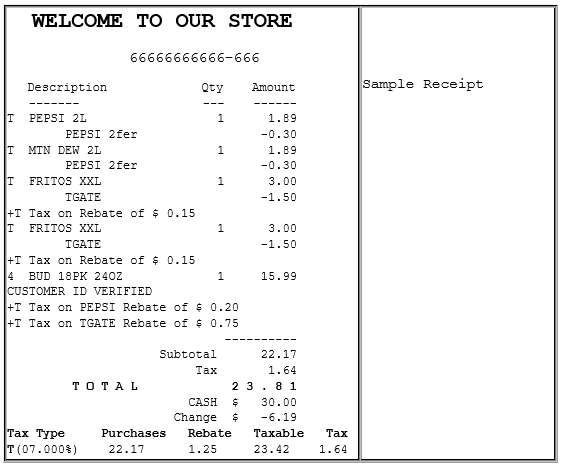
Consumer purchases 2 2L Pepsi products (Pepsi 2Fer), 2 Fritos XXL (item eligible rebate) and 1 18 PK of 24 OZ Bud (combined with Fritos, eligible for TGate Promo Rebate).
Item Rebates: Fritos Combo Rebate: TGATE MixMtch Rebate: PEPSI
**Tax Type Purchases Rebate Taxable Tax**
T(07.000%) 22.17 1.25 23.42 1.64
### **Taxable Rebate on Multiple Taxes**
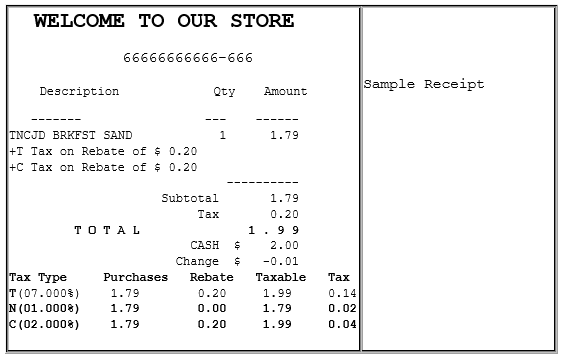
Consumer purchases a single JD Breakfast Sandwich which has a taxable rebate of $ 0.15
JD Breakfast Sandwich is flagged with three separate taxes; two of which have rebates defined.
**Tax Type Purchases Rebate Taxable Tax**
T(07.000%) 1.79 0.20 1.99 0.14
N(01.000%) 1.79 0.00 1.79 0.02
C(02.000%) 1.79 0.20 1.99 0.04
## Configuring Taxable Rebates
### Sales Configuration
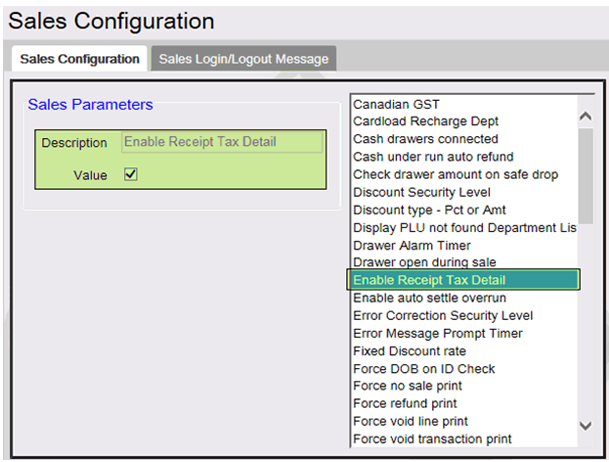
Use **Store Operations > Sales > Sales Configuration** to enable the taxable rebates feature.
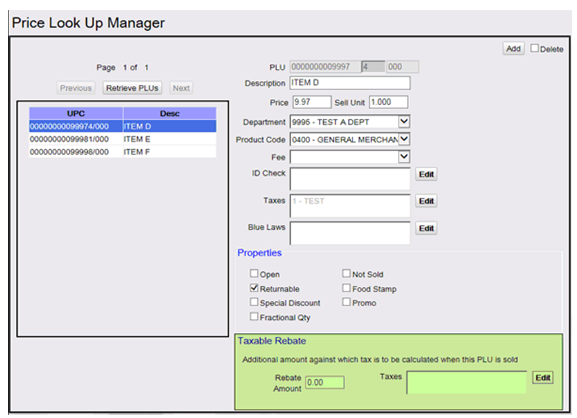
### Price Look Up Manager
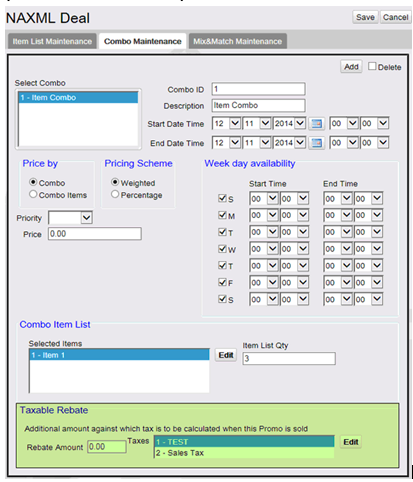
### Combos (NAXML Promotions)
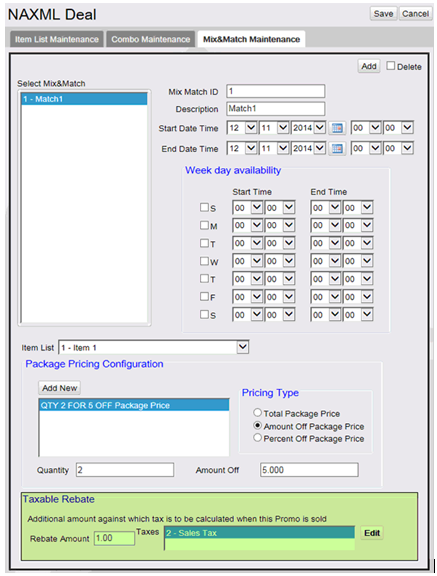
### Match (NAXML Promotions)
## Reporting
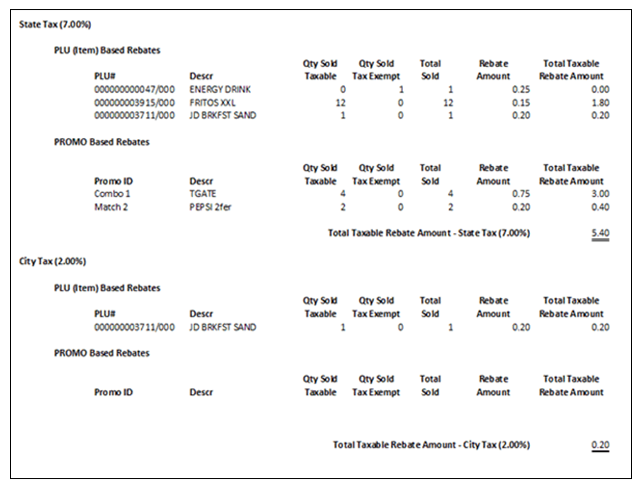
### Taxable Rebate Report
For each tax against which taxable rebate is applied, the taxable rebate report shows sales (taxed and tax exempt), rebate amount and a calculated total of the increased taxable sales. Totals are shown separately for item based rebates and promo based rebates.
---
# Agent Instructions
This documentation is published with GitBook. GitBook is the documentation platform designed so that both humans and AI agents can read, navigate, and reason over technical content effectively. Learn more at gitbook.com.
## Querying This Documentation
If you need additional information that is not directly available in this page, you can query the documentation dynamically by asking a question.
Perform an HTTP GET request on the current page URL with the `ask` query parameter, and the optional `goal` query parameter:
```
GET https://docs.verifone.com/cug-55.02/commander-user-reference-55.02/taxable-rebates.md?ask=&goal=
```
`ask` is the immediate question: it should be specific, self-contained, and written in natural language.
`goal` is optional and describes the broader end goal you are ultimately trying to accomplish on behalf of the user. GitBook uses it to tailor the answer towards what is most useful for that goal.
The response will contain a direct answer to the question and relevant excerpts and sources from the documentation.
Use this mechanism when the answer is not explicitly present in the current page, you need clarification or additional context, or you want to retrieve related documentation sections.