Refunds

Refunds and Sales are separate transaction types and cannot be combined.

Overview

Refunds and Sales are separate transaction types and cannot be combined. Refunds are subject to additional rules and restrictions; some that can be configured, some that are determined by the card processing network and some that are determined by your company’s policies and procedures.

Using Refunds

Sales and Refunds are separate transaction types and cannot be combined. Any Refund must start by selecting REFUND.

Steps to perform a refund

  1. Press [REFUND] to indicate that this is a REFUND transaction

  2. If prompted, key the User ID and password

  3. Enter items to be refunded as appropriate

  4. Press [TOTAL] if required

  5. Touch or press the method of payment (MOP)

The system does not consider the following scenarios as Refunds:

  • Funds returned to customer from Prepay Underrun.

  • Funds returned to customer from a sales transaction with negative line items that force the transaction total to be negative.

Configuring Refunds

Parameter
Path
Value
Description

Allow Refund

Store Operations > PLUs > Properties

Yes, No

Select to allow this MOP to be given to a customer when an item is refunded.

Refundable

Store Operations > Payment > MOP

Yes, No

Select to allow the PLU item to be returned for a refund.

Refund Security

Store Operations > Sales > Sales Configuration

Yes, No

Enter the security level an employee must have to

perform a refund transaction.

Entering 1 - 9 indicates

that an employee with a security level of at least that

number must approve refunds (0 - 9).

0 — Refunds do not require a security check.

Reporting

Report Details

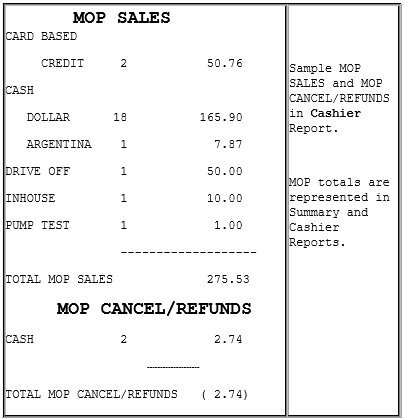
  • MOP SALES: Summary of sales by method of payment (MOP).

If a foreign currency has been set up in the Currency File that currency appears in the CASH section.

  • MOP CANCEL/REFUNDS: Summary of cancelled or refunded transactions. The total is displayed in parentheses because the number is negative.

Troubleshooting

#
Message
Description/Action

E1257

MUST PRESS CREDIT

Part of the Auto-Refund feature. A credit card was used to pay for the initial prepay transaction and cashier tries to refund the underrun amount to any MOP other than credit.

E1113

NO REFUND ALLOWED

No refund is allowed on this PLU or in this department.

E1150

REFUND NOT ALLOWED ON CREDIT SALE

A credit card purchase cannot be refunded in cash.

E1164

REFUND NOT ALLOWED

“Refund Allowed” is set to ‘No’.

E1257

MUST PRESS CREDIT

Part of the Auto-Refund feature. A credit card was used to pay for the initial prepay transaction and cashier tries to refund the underrun amount to any MOP other than credit.

Was this helpful?