> For the complete documentation index, see [llms.txt](https://docs.verifone.com/llms.txt). Markdown versions of documentation pages are available by appending `.md` to page URLs; this page is available as [Markdown](https://docs.verifone.com/cug-56.02/commander-user-reference-56.02/restrictions.md).
# Restrictions
In a transaction, restrictions prevent sales of specific items during specific periods of time and restrict sale of some products by age.
## Overview
In a transaction, restrictions prevent sales of specific items during specific periods of time and restrict sale of some products by age.
In a transaction, the following types of restrictions can be used:
* **Blue Law** — Set up local government time periods that restrict sales on certain items during defined periods of time.
* **Customer ID Check** — Sale of some products is restricted by age.
## Using Restrictions
### Customer ID Check
{% hint style="info" %}
Refer to the Age Restrictions feature reference documentation for information on Customer ID Check.
{% endhint %}
#### Configuring PIN Pad for ID Check
On the C18 POS a new option for swiping of driver’s license is available from the PIN pad as the C18 does not have an MSR to swipe the ID card.
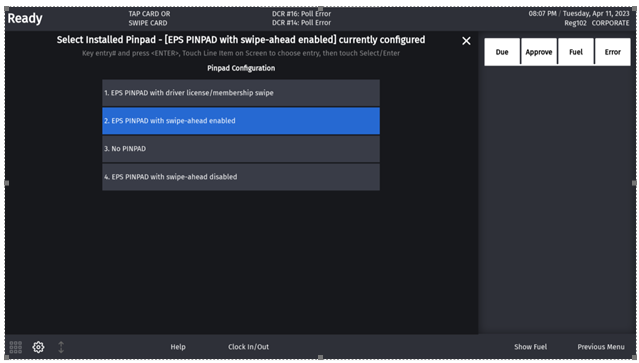
On the C18 POS go to **CSR > Maintenance > Device Configuration > Pinpad Configuration** and select "EPS PINPAD with driver license/membership swipe".
{% hint style="info" %}
From Base 53.12.00, this option is also available from Topaz and Ruby2.
{% endhint %}
#### *Swipe-ahead Functionality*
From Base 54.00.00, PIN pad configuration on POS has 4 options.
{% stepper %}
{% step %}
EPS PINPAD — with driver's license and membership swipe
Used for sites that do not support scanning IDs and require swiping them.
{% endstep %}
{% step %}
EPS PINPAD — with swipe-ahead enabled
Behavior:
When swipe-ahead is enabled, the PIN pad is turned off until the first item is added to a ticket. In the EPS PINPAD option without the swipe-ahead (enabled or disabled) option, the PIN pad is activated at soon as the POS is in sales idle mode. Swipe-ahead enabled helps prevent a previous customer being charged for someone else's transaction.
{% endstep %}
{% step %}
NO PINPAD
Use where a PIN pad is not present.
{% endstep %}
{% step %}
EPS PINPAD — with swipe-ahead disabled
Behaviour:
When swipe-ahead is disabled, the PIN pad is turned off until the cashier presses either:
* A network MOP or
* TOTAL - if Loyalty and the Auth on Total in Loyalty configuration is enabled.
In other words, the card reader is turned on when the first request goes to EPS.
{% endstep %}
{% endstepper %}
{% hint style="info" %}
Regardless of configuration, swipe-ahead will be disabled automatically when the POS application is switched to the Self-Checkout (SCO) application.
{% endhint %}
## Configuring Restrictions
### Blue Laws
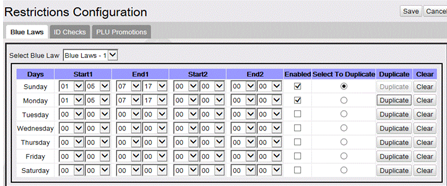
Use **Store Operations > Restrictions > Blue Laws** form to set up, delete, or edit Blue Laws.
For the Blue Laws to take effect for departments and PLUs, Blue Laws must be selected for the specific department or PLU.
| Field / Button | Allowable Value / Function |
| --------------------------------------------------------------------- | ------------------------------------------------------------------------------------------------------------------------------------------------------ |
| Clear | Click to delete the selected Blue Law information. |
| Select To Duplicate | Check the "**Select To Duplicate**" check box for the row to be duplicated. Click the Duplicate button for each row that should contain the same data. |
| Enabled | Select to activate a Blue Law for each day (Blue Laws may be set up ahead of time and activated later). |
| Start 1 | Enter the start time (24-hour clock) for the first Blue Law on a specific day (00:00 – 23:59). Press Tab. |
| *Note:* The start time cannot be the same as the end time. | |
| End 1 | Enter the end time (24-hour clock) for the first Blue Law on a specific day (00:00 – 23:59). Press Tab. |
| *Note:* To set the end time to midnight, enter the end time as 23:59. | |
| Start 2 | If the Blue Law is in effect again on the same day, enter the second start time (00:00 – 23:59). Press Tab. |
| End 2 | If the Blue Law is in effect again on the same day, enter the second end time (00:00 – 23:59). Press Tab. |
### ID Checks
Use **Store Operations > Restrictions > ID Checks** to set up, delete, or edit Customer ID Checks.
{% hint style="info" %}
Refer to the Age Restrictions feature reference documentation for information on Customer ID Check.
{% endhint %}
***
## Reporting
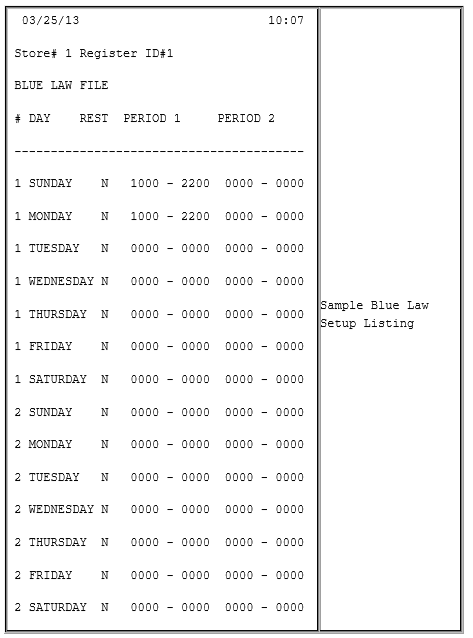
### Blue Law Report (sample)
## Troubleshooting
| # | Message | Description / Action |
| ----- | ----------------------------------- | ----------------------------------------------------------------------------------------------------------------------------------------------------------------------------------------------------------------------------------- |
| E1141 | PURCH. NOT ALLOWED | The customer cannot purchase this item because either: (1) the DOB entered for the ID check does not meet the age requirements; or (2) a Blue Law restriction has been set up for this item or department at this time on this day. |
| E1196 | BLUE LAW RESTRICTION | A Blue Law restriction is set up for this item or department, preventing its sale during a certain time of the day. |
| E1216 | LICENSE TRACK 2 EMPTY | The driver's license reader failed to read the magnetic stripe information. Run the ID check again or enter the information manually. |
| E1219 | LICENSE EXPIRATION DATE ERROR | The driver’s license just swiped/scanned has expiration date information errors. Run the ID check again or enter the information manually. |
| E1220 | LICENSE BIRTH DATE INVALID | The driver’s license just swiped/scanned has invalid birth date information. Run the ID check again or enter the information manually. |
| E1263 | ITEM REJECT - BIRTHDATE ENTRY REQ'D | Attempted to continue the transaction without responding to the ID check prompt with a valid DOB entry. |
---
# Agent Instructions
This documentation is published with GitBook. GitBook is the documentation platform designed so that both humans and AI agents can read, navigate, and reason over technical content effectively. Learn more at gitbook.com.
## Querying This Documentation
If you need additional information that is not directly available in this page, you can query the documentation dynamically by asking a question.
Perform an HTTP GET request on the current page URL with the `ask` query parameter, and the optional `goal` query parameter:
```
GET https://docs.verifone.com/cug-56.02/commander-user-reference-56.02/restrictions.md?ask=&goal=
```
`ask` is the immediate question: it should be specific, self-contained, and written in natural language.
`goal` is optional and describes the broader end goal you are ultimately trying to accomplish on behalf of the user. GitBook uses it to tailor the answer towards what is most useful for that goal.
The response will contain a direct answer to the question and relevant excerpts and sources from the documentation.
Use this mechanism when the answer is not explicitly present in the current page, you need clarification or additional context, or you want to retrieve related documentation sections.