> For the complete documentation index, see [llms.txt](https://docs.verifone.com/llms.txt). Markdown versions of documentation pages are available by appending `.md` to page URLs; this page is available as [Markdown](https://docs.verifone.com/cug-56.03/cug-56.03-en-es-419/referencia-del-usuario-de-commander-56.03/reembolsos.md).

# Reembolsos

Los reembolsos y las ventas son tipos de transacción distintos y no se pueden combinar.

## Descripción general

Los reembolsos y las ventas son tipos de transacción distintos y no se pueden combinar. Los reembolsos están sujetos a reglas y restricciones adicionales: algunas se pueden configurar, otras las determina la red de procesamiento de tarjetas y otras las establecen las políticas y los procedimientos de su empresa.

## Uso de los reembolsos

Las ventas y los reembolsos son tipos de transacción distintos y no se pueden combinar. Para iniciar cualquier reembolso, primero debe seleccionar REFUND.

Pasos para realizar un reembolso

1. Presione **\[REFUND]** para indicar que se trata de una transacción de reembolso
2. Si se le solicita, ingrese el ID de usuario y la contraseña
3. Ingrese los artículos que se reembolsarán, según corresponda
4. Presione **\[TOTAL]** si es necesario
5. Toque o presione el método de pago (MOP)

El sistema no considera como reembolsos los siguientes casos:

* Fondos devueltos al cliente por un faltante de prepago.
* Fondos devueltos al cliente de una transacción de venta con partidas negativas que hacen que el total de la transacción sea negativo.

## Configuración de los reembolsos

<table><thead><tr><th valign="top">Parámetro</th><th valign="top">Ruta</th><th valign="top">Valor</th><th valign="top">Descripción</th></tr></thead><tbody><tr><td valign="top">Permitir reembolso</td><td valign="top">Store Operations > PLUs > Properties</td><td valign="top">Sí, No</td><td valign="top">Seleccione esta opción para permitir que se use este MOP para reembolsar un artículo a un cliente.</td></tr><tr><td valign="top">Reembolsable</td><td valign="top">Store Operations > Payment > MOP</td><td valign="top">Sí, No</td><td valign="top">Seleccione esta opción para permitir que se devuelva el artículo PLU y se emita un reembolso.</td></tr><tr><td valign="top">Seguridad de reembolsos</td><td valign="top">Operaciones de la tienda > Ventas > Configuración de ventas</td><td valign="top">Sí, No</td><td valign="top"><p>Ingrese el nivel de seguridad que debe tener un empleado para</p><p>realizar una transacción de reembolso.</p><p>Ingresar un valor del 1 al 9 indica</p><p>que un empleado con un nivel de seguridad igual o superior a ese</p><p>número debe aprobar los reembolsos (0-9).</p><p>0: los reembolsos no requieren una verificación de seguridad.</p></td></tr></tbody></table>

## Informes

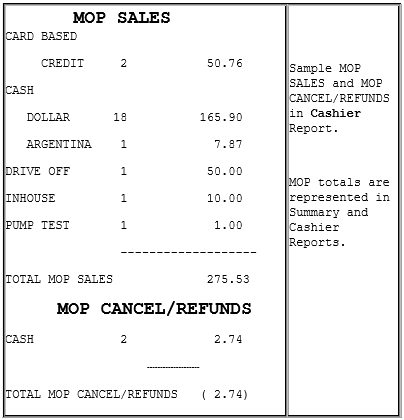
<figure><img src="https://content.gitbook.com/content/emjnrEfsss23FYW6N0Tj/blobs/KPMhfRbAryVoQz2LFkaa/image.png" alt=""><figcaption></figcaption></figure>

### Detalles del informe

* **VENTAS POR MDP**: Resumen de las ventas por método de pago (MDP).

{% hint style="info" %}
Si se configuró una moneda extranjera en el archivo de monedas, esa moneda aparece en la sección CASH.
{% endhint %}

* **CANCELACIONES/REEMBOLSOS POR MDP**: Resumen de las transacciones canceladas o reembolsadas. El total aparece entre paréntesis porque es un número negativo.

## Solución de problemas

| #     | Mensaje                                                   | Descripción/Acción                                                                                                                                                                                                     |
| ----- | --------------------------------------------------------- | ---------------------------------------------------------------------------------------------------------------------------------------------------------------------------------------------------------------------- |
| E1257 | DEBE PRESIONAR CREDIT                                     | Forma parte de la función de reembolso automático. Se usó una tarjeta de crédito para pagar la transacción de prepago inicial y el cajero intenta reembolsar el monto del faltante mediante un MOP que no sea crédito. |
| E1113 | NO SE PERMITEN REEMBOLSOS                                 | No se permite reembolsar este PLU ni los artículos de este departamento.                                                                                                                                               |
| E1150 | NO SE PERMITE REEMBOLSAR UNA VENTA CON TARJETA DE CRÉDITO | No se puede reembolsar en efectivo una compra realizada con tarjeta de crédito.                                                                                                                                        |
| E1164 | NO SE PERMITEN REEMBOLSOS                                 | La opción “Refund Allowed” está configurada como ‘No’.                                                                                                                                                                 |
| E1257 | DEBE PRESIONAR CREDIT                                     | Forma parte de la función de reembolso automático. Se usó una tarjeta de crédito para pagar la transacción de prepago inicial y el cajero intenta reembolsar el monto del faltante mediante un MOP que no sea crédito. |


---

# Agent Instructions
This documentation is published with GitBook. GitBook is the documentation platform designed so that both humans and AI agents can read, navigate, and reason over technical content effectively. Learn more at gitbook.com.

## Querying This Documentation
If you need additional information that is not directly available in this page, you can query the documentation by asking a question.

Perform an HTTP GET request on the following URL with the `ask` and `goal` query parameters:

```
GET https://docs.verifone.com/cug-56.03/cug-56.03-en-es-419/referencia-del-usuario-de-commander-56.03/reembolsos.md?ask=<question>&goal=<user_goal>
```

`ask` is the immediate question: it should be specific, self-contained, and written in natural language.
`goal` is what the user is ultimately trying to achieve, the reason they need the answer. Sharing it helps GitBook give you a better, more relevant answer. A goal is most helpful when it describes the outcome the user wants rather than restating the question. For example, with `ask=how do I create an API token`, a goal like `automate deployments from our CI pipeline` lets GitBook tailor the answer to that use case.

The response will contain a direct answer to the question and relevant excerpts and sources from the documentation.

Use this mechanism when the answer is not explicitly present in the current page, you need clarification or additional context, or you want to retrieve related documentation sections.
