> For the complete documentation index, see [llms.txt](https://docs.verifone.com/llms.txt). Markdown versions of documentation pages are available by appending `.md` to page URLs; this page is available as [Markdown](https://docs.verifone.com/cug-57.00/cug-57.00-es/referencia-de-usuario-de-commander-57.00/actualizacion-automatica-y-vrsd.md).
# Actualización automática y VRSD
La función de actualización automática permite a un sitio iniciar una actualización completa del software sin requerir la presencia ni la experiencia de un técnico (VASC) ni la intervención del HelpDesk de Verifone.
### Resumen
La función de actualización automática permite a un sitio iniciar una actualización completa del software sin requerir la presencia ni la experiencia de un técnico (VASC) ni la intervención del HelpDesk de Verifone.
El software se transfiere al sistema ya sea mediante el programa Auto\_Upgrade.jar o mediante una descarga remota automatizada de software. Verifone Remote Software Download (VRSD) es el nombre de la implementación de Verifone de la descarga remota automatizada de software.
{% hint style="info" %}
*Consulte la documentación de referencia de la función de actualización automática para obtener información sobre esta función.*
{% endhint %}
{% hint style="info" %}
*Si un sitio está actualizando desde la versión 53.26 o inferior a la versión 55.02 y superiores, se recomienda usar las siguientes instrucciones en lugar de Package Sender (Auto\_Upgrade.jar):*
* *Haga una copia de seguridad de los datos del sitio usando la utilidad SMS Import/Export.*
* *Realice una recarga manual usando el instalador de Petro Suite.*
* *Restaure los datos del sitio usando la utilidad SMS Import/Export.*
*Los métodos alternativos de carga de software son VRSD y USB. Consulte las Guías de instalación de software de Verifone Commander y POS para obtener más detalles.*
{% endhint %}
{% hint style="info" %}
*Actualizaciones de la función de actualización automática en la versión 55.02 de Verifone:*
* *Función de actualización automática optimizada para completarse más rápido:*
* *Si no hay cambios en el sistema operativo (OS), el OS no se reinstala. Esto permite que la actualización automática se complete más rápido según los dispositivos del sitio.*
* *Si no hay cambios de esquema, la base de datos Totals se actualiza usando un script de shell en lugar de XML, y permite que la actualización automática se complete más rápido según el volumen de datos del sitio.*
* *Para una resolución óptima de cualquier error que ocurra* durante/*después de la Actualización automática, se conserva en el sistema el historial de las Actualizaciones automáticas.*
{% endhint %}
### Dispositivos EOL
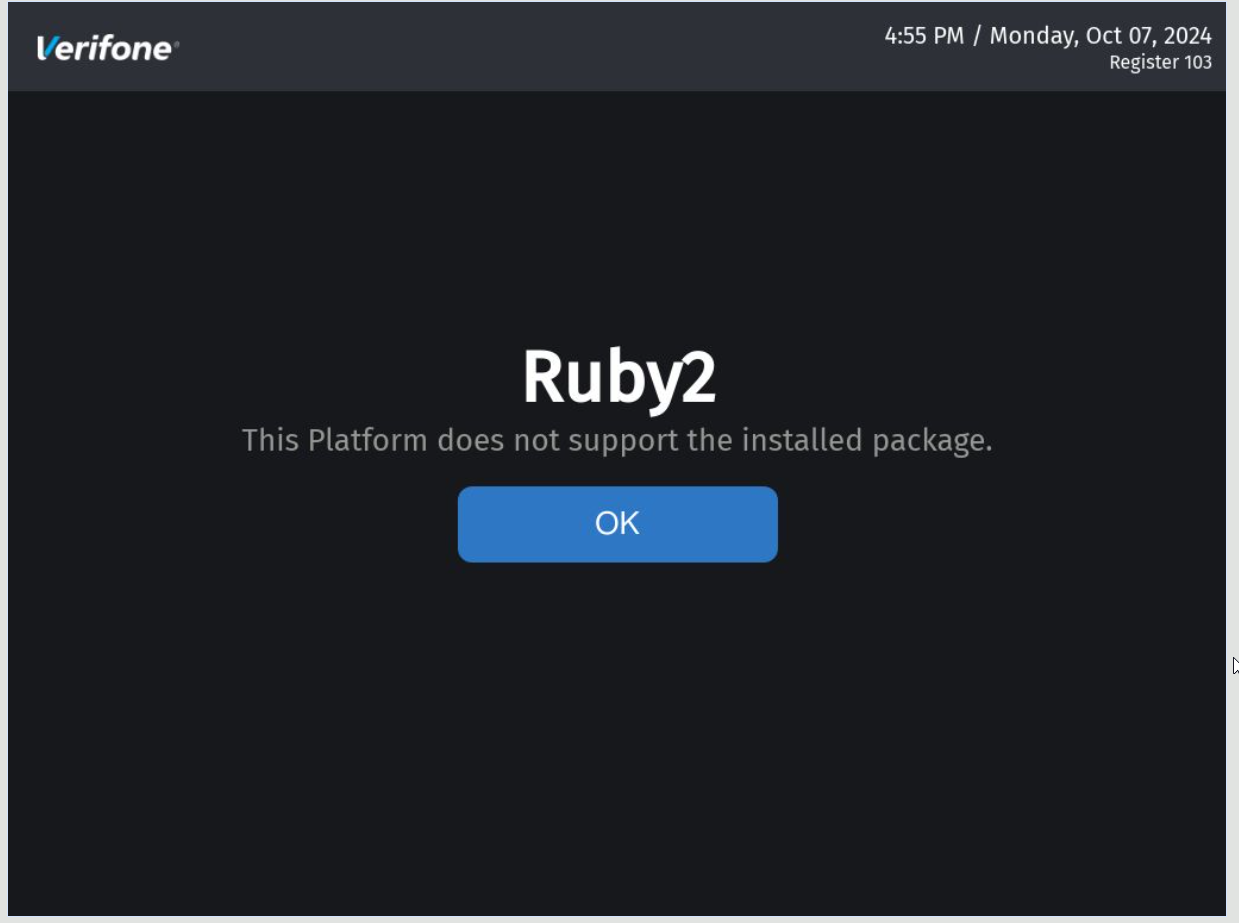
A partir de la versión 56.00 de Verifone Commander, la actualización o instalación de software está bloqueada en dispositivos heredados/EOL (Ruby 2, CommanderCi, Commander 16, RubyCi, Topaz 410) para las regiones de Norteamérica.
A partir de la versión 57.00 de Verifone Commander, la actualización o instalación de software está bloqueada en dispositivos heredados/EOL (Ruby 2, CommanderCi, Commander 16, RubyCi, Topaz 410) para las regiones de Latinoamérica.
AU falla si se encuentran dispositivos heredados/EOL en el sistema echo con los siguientes mensajes, según los dispositivos encontrados:


### **Instalación con PSI anterior**
En caso de que el software se instale con un PSI anterior, aparece el siguiente mensaje:
---
# Agent Instructions
This documentation is published with GitBook. GitBook is the documentation platform designed so that both humans and AI agents can read, navigate, and reason over technical content effectively. Learn more at gitbook.com.
## Querying This Documentation
If you need additional information that is not directly available in this page, you can query the documentation by asking a question.
Perform an HTTP GET request on the following URL with the `ask` and `goal` query parameters:
```
GET https://docs.verifone.com/cug-57.00/cug-57.00-es/referencia-de-usuario-de-commander-57.00/actualizacion-automatica-y-vrsd.md?ask=&goal=
```
`ask` is the immediate question: it should be specific, self-contained, and written in natural language.
`goal` is what the user is ultimately trying to achieve, the reason they need the answer. Sharing it helps GitBook give you a better, more relevant answer. A goal is most helpful when it describes the outcome the user wants rather than restating the question. For example, with `ask=how do I create an API token`, a goal like `automate deployments from our CI pipeline` lets GitBook tailor the answer to that use case.
The response will contain a direct answer to the question and relevant excerpts and sources from the documentation.
Use this mechanism when the answer is not explicitly present in the current page, you need clarification or additional context, or you want to retrieve related documentation sections.