> For the complete documentation index, see [llms.txt](https://docs.verifone.com/llms.txt). Markdown versions of documentation pages are available by appending `.md` to page URLs; this page is available as [Markdown](https://docs.verifone.com/cug-57.01-en/commander-user-reference-57.01/auto-upgrade-and-vrsd.md).
# Auto Upgrade and VRSD
The Auto Upgrade feature allows a site to initiate a complete software upgrade without requiring the presence or expertise of a technician (VASC) or intervention from the Verifone HelpDesk.
### Overview
The Auto Upgrade feature allows a site to initiate a complete software upgrade without requiring the presence or expertise of a technician (VASC) or intervention from the Verifone HelpDesk.
The software is transferred to the system either by using the Auto\_Upgrade.jar program or by an automated remote software download. Verifone Remote Software Download (VRSD) is the name for Verifone's implementation of the automated remote software download.
Auto Upgrade preserves the complete Commander configuration. It also runs initialization commands, including Fuel and DCR, so the system is ready for normal business use immediately after the upgrade. No additional end-user steps are required.
{% hint style="info" %}
*Refer to the* [*Auto Upgrade*](/feature-references/features-and-products-references/auto-upgrade.md) *feature reference documentation for information on this feature.*
{% endhint %}
{% hint style="info" %}
*If a site is upgrading from release 53.26 or lower to release 55.02 and higher, it is recommended to use the following instructions instead of the Package Sender (Auto\_Upgrade.jar):*
* *Back up the site data using the SMS Import/Export Utility.*
* *Perform a manual reload using the Petro Suite Installer.*
* *Restore the site data using the SMS Import/Export Utility.*
*The alternative software loading methods are VRSD and USB. See the Verifone Commander and POS Software Installation Guides for more details.*
{% endhint %}
{% hint style="info" %}
*Updates to Auto Upgrade feature in Verifone Release 55.02:*
* *Auto Upgrade feature optimized to complete faster:*
* *If there are no changes to Operating System (OS), the OS is not reinstalled. This enables the auto upgrade to be completed faster depending on the devices at the site.*
* *If there are no schema changes, Totals Database is updated using a shell script instead of using XML and enables the auto upgrade to complete faster depending on volume of data at the site.*
* *For optimal troubleshooting of any errors occurring* during/*after Auto Upgrade, the history of Auto Upgrades are retained on the system.*
{% endhint %}
### EOL Devices
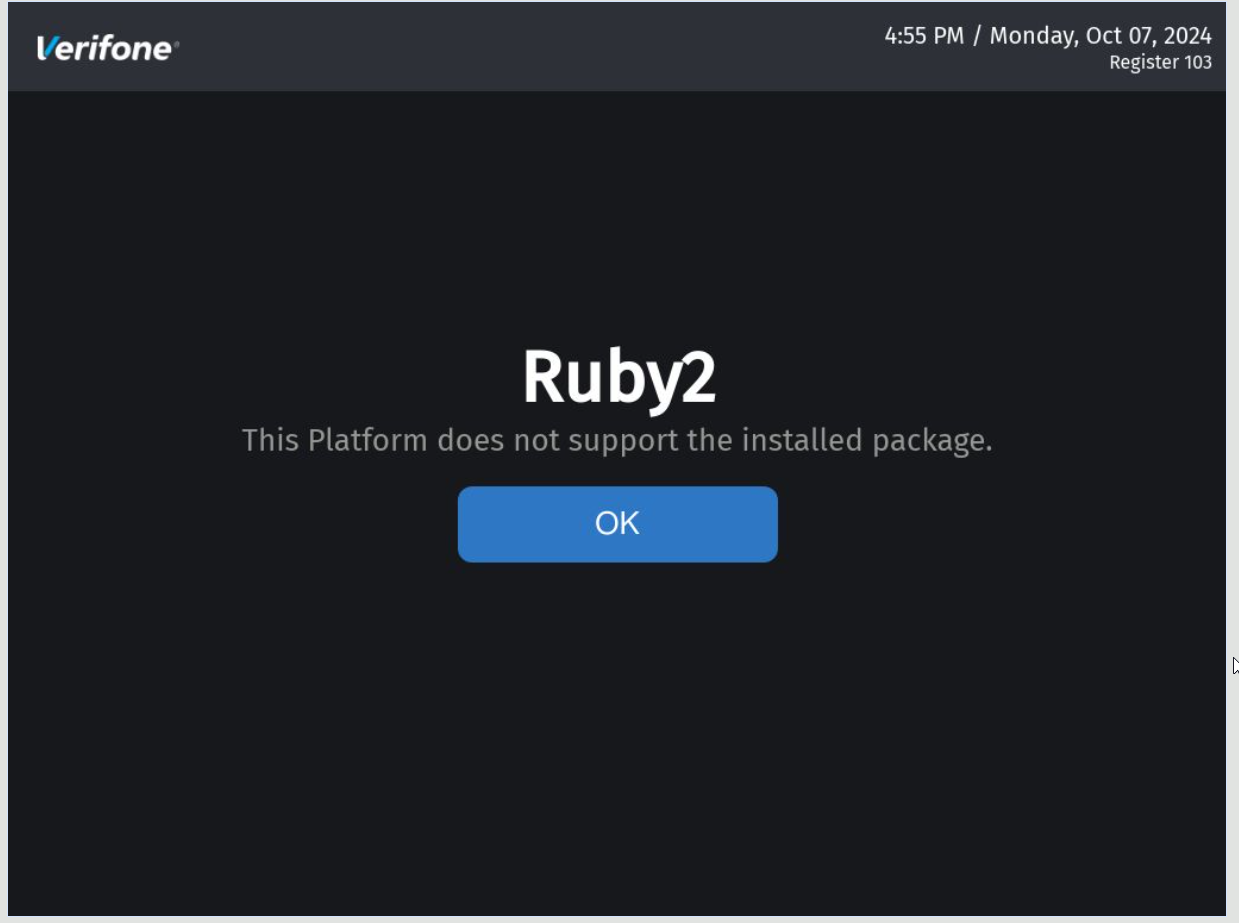
From Verifone Commander Release 56.00 software upgrade or software install is blocked on EOL/Legacy Devices (Ruby 2, CommanderCi, Commander 16, RubyCi,Topaz 410) for North America regions.
From Verifone Commander Release 57.00 software upgrade or software install is blocked on EOL/Legacy Devices (Ruby 2, CommanderCi, Commander 16, RubyCi,Topaz 410) for Latin America regions.
AU fails if any legacy/EOL devices are found in the echo system with the following messages depending on the devices found:


### **Installing With Older PSI**
In case software is installed with older PSI, the following message appears:
---
# Agent Instructions
This documentation is published with GitBook. GitBook is the documentation platform designed so that both humans and AI agents can read, navigate, and reason over technical content effectively. Learn more at gitbook.com.
## Querying This Documentation
If you need additional information that is not directly available in this page, you can query the documentation by asking a question.
Perform an HTTP GET request on the following URL with the `ask` and `goal` query parameters:
```
GET https://docs.verifone.com/cug-57.01-en/commander-user-reference-57.01/auto-upgrade-and-vrsd.md?ask=&goal=
```
`ask` is the immediate question: it should be specific, self-contained, and written in natural language.
`goal` is what the user is ultimately trying to achieve, the reason they need the answer. Sharing it helps GitBook give you a better, more relevant answer. A goal is most helpful when it describes the outcome the user wants rather than restating the question. For example, with `ask=how do I create an API token`, a goal like `automate deployments from our CI pipeline` lets GitBook tailor the answer to that use case.
The response will contain a direct answer to the question and relevant excerpts and sources from the documentation.
Use this mechanism when the answer is not explicitly present in the current page, you need clarification or additional context, or you want to retrieve related documentation sections.