> For the complete documentation index, see [llms.txt](https://docs.verifone.com/llms.txt). Markdown versions of documentation pages are available by appending `.md` to page URLs; this page is available as [Markdown](https://docs.verifone.com/feature-references/feature-references-lac-es/referencias-de-funciones-y-productos/caja-fuerte-electronica/configuracion-de-la-caja-fuerte-electronica/configuracion-de-mop-de-deposito-en-caja-fuerte.md).
# Configuración de MOP de depósito en caja fuerte
{% stepper %}
{% step %}
## Ir a Pago
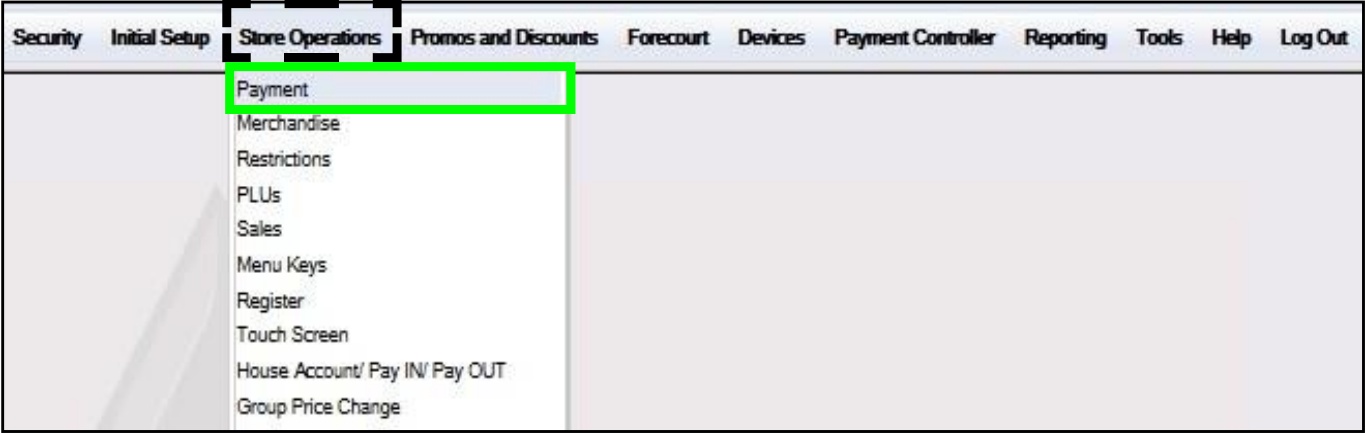
En el cliente de configuración de comandos, vaya a: Operaciones de tienda > Pago.
 {% endstep %}
{% step %}
## Seleccione la pestaña MOP
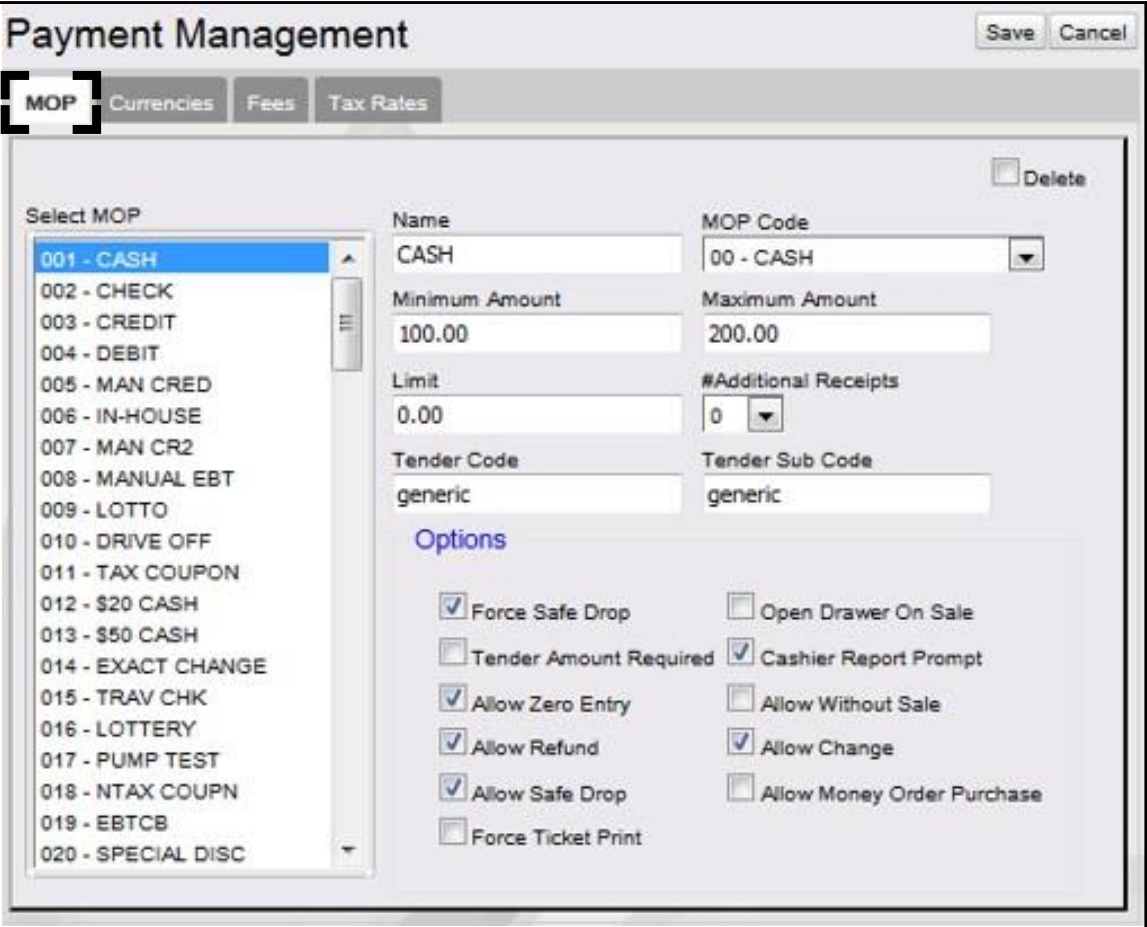
En el formulario de administración de pagos, seleccione la pestaña \[MOP].
 {% endstep %}
{% step %}
## Seleccione un MOP
En la lista MOP, seleccione el \ deseado para configurarlo para el depósito seguro.
{% endstep %}
{% step %}
## Permitir depósito seguro
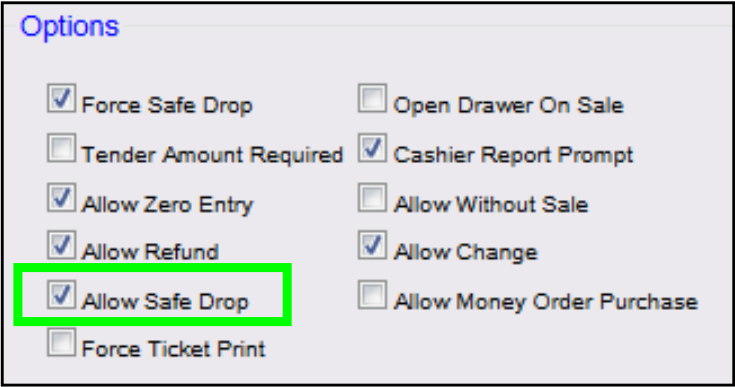
En la sección de Opciones, seleccione \[Permitir depósito seguro].
 | Valor | Descripción |
| ------------------------ | --------------------------------------------------------------------------- |
| Opciones | |
| Forzar depósito seguro | Habilita un mensaje de depósito seguro (si el valor del límite no es 0.00). |
| Permitir depósito seguro | Permite un depósito seguro para este tipo de pago. |
| {% endstep %} | |
{% step %}
## Configurar tipos de pago adicionales
Repita los pasos anteriores para cada tipo de pago individual para permitir depósitos seguros.
{% endstep %}
{% step %}
## Guardar y actualizar la configuración
Seleccione \[Guardar] para aceptar, o \[Cancelar] para salir sin guardar los cambios.
Para aplicar la nueva configuración, vaya a: Cliente de configuración > Herramientas > Actualizar configuración.
{% endstep %}
{% endstepper %}
---
# Agent Instructions
This documentation is published with GitBook. GitBook is the documentation platform designed so that both humans and AI agents can read, navigate, and reason over technical content effectively. Learn more at gitbook.com.
## Querying This Documentation
If you need additional information that is not directly available in this page, you can query the documentation by asking a question.
Perform an HTTP GET request on the following URL with the `ask` and `goal` query parameters:
```
GET https://docs.verifone.com/feature-references/feature-references-lac-es/referencias-de-funciones-y-productos/caja-fuerte-electronica/configuracion-de-la-caja-fuerte-electronica/configuracion-de-mop-de-deposito-en-caja-fuerte.md?ask=&goal=
```
`ask` is the immediate question: it should be specific, self-contained, and written in natural language.
`goal` is what the user is ultimately trying to achieve, the reason they need the answer. Sharing it helps GitBook give you a better, more relevant answer. A goal is most helpful when it describes the outcome the user wants rather than restating the question. For example, with `ask=how do I create an API token`, a goal like `automate deployments from our CI pipeline` lets GitBook tailor the answer to that use case.
The response will contain a direct answer to the question and relevant excerpts and sources from the documentation.
Use this mechanism when the answer is not explicitly present in the current page, you need clarification or additional context, or you want to retrieve related documentation sections.