> For the complete documentation index, see [llms.txt](https://docs.verifone.com/llms.txt). Markdown versions of documentation pages are available by appending `.md` to page URLs; this page is available as [Markdown](https://docs.verifone.com/feature-references/features-and-products-references/release-53-and-higher-ui-reference.md). Agents can also search and read this documentation through its [MCP server](https://docs.verifone.com/~gitbook/mcp).
# Release 53 & Higher UI Reference
## Release 53 and Higher Overview
## Release 53 and Higher UI Objectives
* Re-uses existing Business Logic and work-flow
* Supports existing peripherals
* Supports same application on current POS system: Ruby2, RubyCi and Topaz 410
**Topaz 310 is NOT supported**
* Allows a mix of register types at a site
* Supports existing register limit (total 32)
* Supports existing install procedures and connectivity
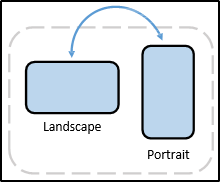
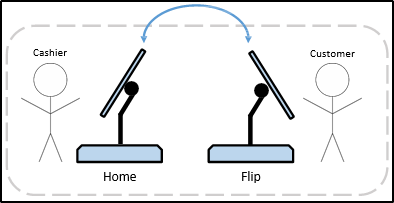
* Supports new C18 POS that can be used for multiple applications based on screen orientation or position
* Orientations: Landscape and Portrait
* Position: Home and Flip
## Release Limitations
The minimum software version required to auto upgrade to Base 53 software is Base 51.14.
If the software installed is lesser than Base 51.14 then perform two auto upgrades. In the first auto upgrade, bring software version to B51.14 and then perform another auto upgrade to B53.
## UI Features
* "Flattened" design elements
* Improved Screen layout
* Improved Parked Menu
* Mobile phone style gesturing and navigation
* Introduced new C18 POS
## New C18 POS Features
* HD Display
* 18.5" (1920 x 1080, 119PPI)
* Multi-touch gestures
* Detachable 120-key Keyboard
* Wired Connection
* Magnetic legs grip cash drawer or mate with bracket
* Graphical Customer Display
* Two-line emulation mode (First-out)
* Existing 2-line Partner model also supported
* Smart Battery
* "Gas gauge" technology
* Charge cycle counter
* Multi-color LED Light Ring
* No MSR
## C18 Hardware Specifications
**Specifications**
* **Storage**: M.2 - 4GB
* **CPU (Intel)**: Celeron 3965U @ 2.20GHz
* **Core(s) per CPU**: 2
* **RAM**: 4 GB
* **Additional Hardware Components:** Camera, Finger Print, Gyroscope, Accelerometer, Customer Display, WiFi Support
---
# Agent Instructions
This documentation is published with GitBook. GitBook is the documentation platform designed so that both humans and AI agents can read, navigate, and reason over technical content effectively. Learn more at gitbook.com.
## Querying This Documentation
If you need additional information that is not directly available in this page, you can query the documentation by asking a question.
Perform an HTTP GET request on the following URL with the `ask` and `goal` query parameters:
```
GET https://docs.verifone.com/feature-references/features-and-products-references/release-53-and-higher-ui-reference.md?ask=&goal=
```
`ask` is the immediate question: it should be specific, self-contained, and written in natural language.
`goal` is what the user is ultimately trying to achieve, the reason they need the answer. Sharing it helps GitBook give you a better, more relevant answer. A goal is most helpful when it describes the outcome the user wants rather than restating the question. For example, with `ask=how do I create an API token`, a goal like `automate deployments from our CI pipeline` lets GitBook tailor the answer to that use case.
The response will contain a direct answer to the question and relevant excerpts and sources from the documentation.
Use this mechanism when the answer is not explicitly present in the current page, you need clarification or additional context, or you want to retrieve related documentation sections.