> For the complete documentation index, see [llms.txt](https://docs.verifone.com/llms.txt). Markdown versions of documentation pages are available by appending `.md` to page URLs; this page is available as [Markdown](https://docs.verifone.com/feature-references/features-and-products-references/vip-naxml/configuring-vip-naxml/combo-maintenance-tab.md).
# Combo Maintenance Tab
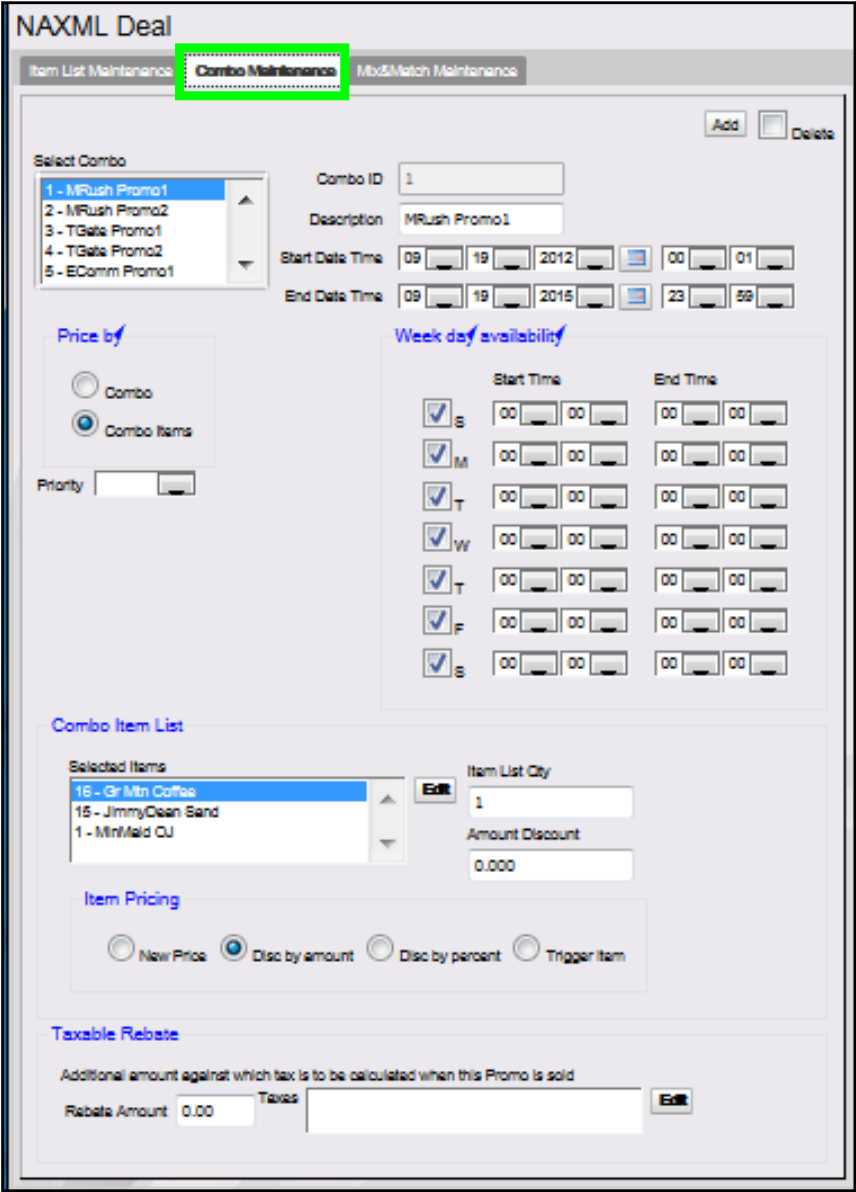
The Combo Maintenance tab is used to define promotions that allow items from two or more item lists to be setup to trigger a discount. A particular Combo may contain both PLU and Department list types.
For example: a "Combo" NAXML deal might require the purchase of a sandwich, a side and a medium fountain drink for a set price. Configuration would require three lists to be created, one to list all the sandwiches in the promotion, one to list the sides and another for the medium fountain drink.
{% stepper %}
{% step %}
Open Combo Maintenance
From the NAXML Deal form > select the \[Combo Maintenance] tab. The Combo Maintenance form will display.
{% endstep %}
{% step %}
Add a Combo Deal
Select \[Add] to create a Combo Deal.
{% endstep %}
{% step %}
Configure the Combo parameters
| Value | Description |
| --------------- | ------------------------------------------------------------------------------------------------- |
| Combo | Define promotions that allow items from two or more item lists to be setup to trigger a discount. |
| Combo ID | Sets the ID used to identify and locate the appropriate Combo Deal. |
| Description | Enter an accurate description for the promotion. |
| Start Date Time | Sets the date and time the promotion starts. |
| End Date Time | Sets the date and time the promotion ends. |
{% hint style="info" %}
An appropriate Combo description should be used as it will appear on the receipt (i.e. Lunch Combo).
{% endhint %}
{% hint style="info" %}
The system allows a promotion with a start date less than its end date. Such a promotion is seen by the system as "inactive." This is advantageous when the same promotion runs for a month and then again several months later. Times are entered in 24 hour format.
{% endhint %}
{% hint style="info" %}
Combos are date and time sensitive. The dates and times drive when the discount applies.
{% endhint %}
{% endstep %}
{% step %}
Configure Week day Availablity
| Value | Description |
| --------------------- | ----------------------------------------------------------------------- |
| Week Day Availability | Allows a discount to run within certain days and times during the week. |
| SMTWTFS | Sets the week days of the promotion. |
| Start Time | Sets the begin time of the promotion. |
| End Time | Sets the stop time of the promotion. |
| {% endstep %} | |
{% step %}
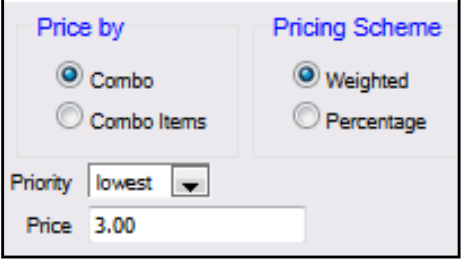
Configure the Price By parameters
| Value | Description |
| --------------------------------------------------------------------------------------------- | ------------------------------------------------------------- |
| Price By | Sets the pricing option. |
| Combo | Sets the price for the Combo as a whole. |
| This option should be used when the price of the items purchased together is always the same. | |
| Combo Items | Allows the discount to be configured based on the item lists. |
| {% endstep %} | |
| {% endstepper %} | |
## Assigning Price by Combo
{% stepper %}
{% step %}
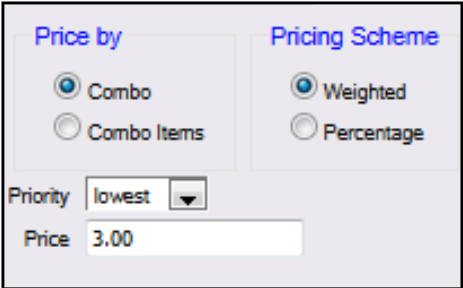
Select Combo as the Price by parameter
{% endstep %}
{% step %}
Select the Combo Priority
{% endstep %}
{% step %}
Enter the Combo Price
{% endstep %}
{% step %}
Select the Combo Pricing Scheme
| Value | Description |
| -------------- | ------------------------------------------------------------------------------------------------------------------------------------------------------------------------------------------------------------------------------------------------------------------------------------------------------------------------------------------------------------------------------------------------------------------------------------------------------------------------------------------------------------------------------------------------------------------------------------------------------------------------------------------ |
| Combo | Sets the price for the Combo as a whole. |
| Priority | Allows certain promotions to take precedence over others that may share the same items (i.e. two different discounts, same item list). |
| Price | Sets the discounted price of the Combo. Priority of promotions is particularly useful when programs give discounts as more items are added in combination. For example: Promo1 - Discount for soda and chips (priority = low) Promo2 - Discount for soda, chips, and sandwich (priority = medium) Promo3 - Discount for soda, chips, sandwich, and salad (priority = high) Without the ability to set priority, promo 2 and 3 will never be realized, as the soda and chips will always form Promo1. The Default setting is medium. Any promotion that does not specifically identify the priority will be assumed "medium" by the system. |
| Pricing Scheme | Determines how the discount appears on the receipt. |
| Weighted | Based on the price of the items. |
| Percentage | Based on the percentage discount field. The total percentage of all items should equal 100%. |
| {% endstep %} | |
{% step %}
Add the item lists
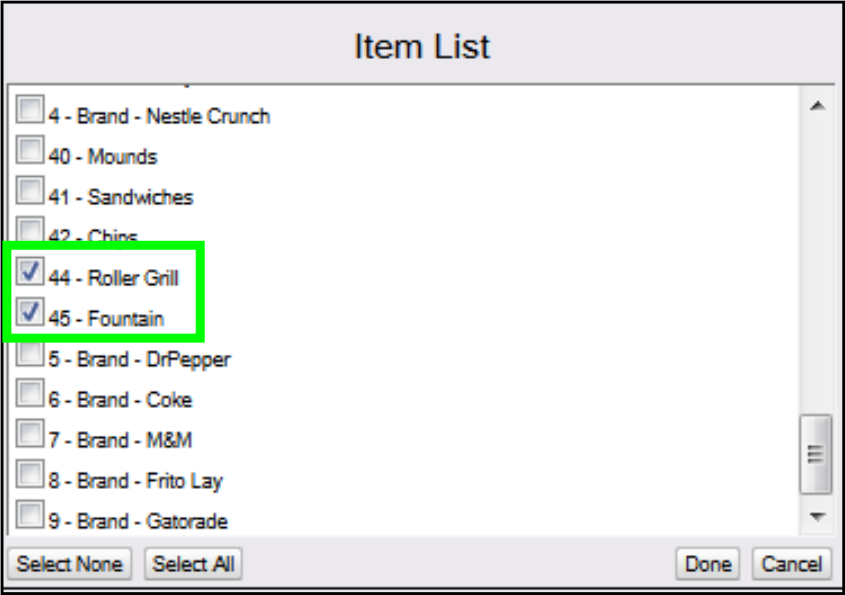
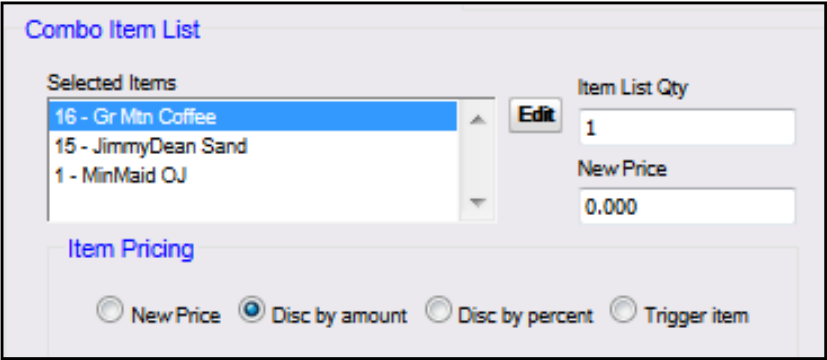
Select \[Edit] to add the Item Lists to be included in the Combo Deal.
1. Select all the \ that apply.
2. Select \[Done].
3. Enter the \ for each Item List in the Combo.
| Value | Description |
| ------------------ | ------------------------------------------------------------------------------------------ |
| Combo Item List | |
| Item List Quantity | Sets the number of items that must be purchased from the list to qualify for the discount. |
| {% endstep %} | |
| {% endstepper %} | |
## Assigning Price By Combo Items
{% stepper %}
{% step %}
Select Combo Items as the Price by parameter
{% endstep %}
{% step %}
Select the Combo Priority
| Value | Description |
| ------------- | ----------------------------------------------------------------------------------------------------------------------------------------------------------------------------------------------------------------------------------------------------------------------------------------------------------------------------------------------------------------------------------------------------------------------------------------------------------------------------------------------------------------------------------------------------------------------------------------------------------------------------------------------------------------------------------------------------------------------------------------- |
| Combo Items | Allows the discount to be configured based on the item lists. |
| Priority | Allows certain promotions to take precedence over others that may share the same items (i.e. two different discounts, same item list). Priority of promotions is particularly useful when programs give discounts as more items are added in combination. For example: Promo1 - Discount for soda and chips (priority = low) Promo2 - Discount for soda, chips, and sandwich (priority = medium) Promo3 - Discount for soda, chips, sandwich, and salad (priority = high) Without the ability to set priority, promo 2 and 3 will never be realized, as the soda and chips will always form Promo1. The Default setting is medium. Any promotion that does not specifically identify the priority will be assumed "medium" by the system. |
| {% endstep %} | |
{% step %}
Add the item lists
Select \[Edit] to add the Item Lists to be included in the Combo Deal.
1. Select all the \ that apply.
2. Select \[Done].
3. Enter an \ for each Item List.
| Value | Description |
| ------------------ | ------------------------------------------------------------------------------------------------ |
| Combo Item List | Allows the discount to be configured based on the item lists. |
| Item List Quantity | Determines the number of items that must be purchased from the list to qualify for the discount. |
| New Price | Assigns a new price to the items in the list for the Combo. |
| {% endstep %} | |
{% step %}
Select the Item Pricing option
Select the \ option and enter the data in the associated field for each Item List.
| Value | Description |
| --------------- | -------------------------------------------------------------- |
| Item Pricing | Controls the discount distribution for the items in the Combo. |
| New Price | Assigns a new price to the items in the list for the Combo. |
| Disc by amount | Discounts a specified amount from the items in the list. |
| Disc by percent | Discounts a specified percentage from the items in the list. |
| Trigger Item | Pulls the PLU price without applying a discount to that item. |
| {% endstep %} | |
{% step %}
Configure the Taxable Rebate parameters
To configure the Taxable Rebate parameters > select \[Edit].
1. Select the \ from the Item List to be calculated.
2. Click \[Done].
3. Enter the \.
| Value | Description |
| -------------- | ---------------------------------------------------------------------------------------------------------------------------------------------------------------------------------------------------------------------------------------------------------------------------- |
| Taxable Rebate | |
| Taxes | Sets the tax to be included in the calculation when this promo is sold. |
| Rebate Amount | Applied when tax laws exist that require sales tax to be collected against the amount of the discount when said discount is a result of an agreement, between the vendor and merchant, that provides for the merchant to be reimbursed for all or part of discounted amount. |
| {% endstep %} | |
{% step %}
Save the Combo Deal
Select \[Save] to accept, or \[Cancel] to exit without saving changes.
{% endstep %}
{% endstepper %}
{% hint style="warning" %}
After configuring an NAXML Combo, ensure the discount is tested on the POS. The Combo will appear once the correct combination of items are entered into the POS.
{% endhint %}
## NAXML Combo Receipt

*The receipt represents a Combo price by item deal: buy one or more items, get another item free.*
The Combo Deal created above consisted of multiple Item Lists. It was priced so that when a customer purchased a hot dog from the selected Item List, they receive a free small fountain drink.
The discount applied is the original price of the small fountain drink ($0.75).
---
# Agent Instructions
This documentation is published with GitBook. GitBook is the documentation platform designed so that both humans and AI agents can read, navigate, and reason over technical content effectively. Learn more at gitbook.com.
## Querying This Documentation
If you need additional information that is not directly available in this page, you can query the documentation by asking a question.
Perform an HTTP GET request on the following URL with the `ask` and `goal` query parameters:
```
GET https://docs.verifone.com/feature-references/features-and-products-references/vip-naxml/configuring-vip-naxml/combo-maintenance-tab.md?ask=&goal=
```
`ask` is the immediate question: it should be specific, self-contained, and written in natural language.
`goal` is what the user is ultimately trying to achieve, the reason they need the answer. Sharing it helps GitBook give you a better, more relevant answer. A goal is most helpful when it describes the outcome the user wants rather than restating the question. For example, with `ask=how do I create an API token`, a goal like `automate deployments from our CI pipeline` lets GitBook tailor the answer to that use case.
The response will contain a direct answer to the question and relevant excerpts and sources from the documentation.
Use this mechanism when the answer is not explicitly present in the current page, you need clarification or additional context, or you want to retrieve related documentation sections.
 {% endstep %}
{% step %}
Add a Combo Deal
Select \[Add] to create a Combo Deal.
{% endstep %}
{% step %}
Configure the Combo parameters
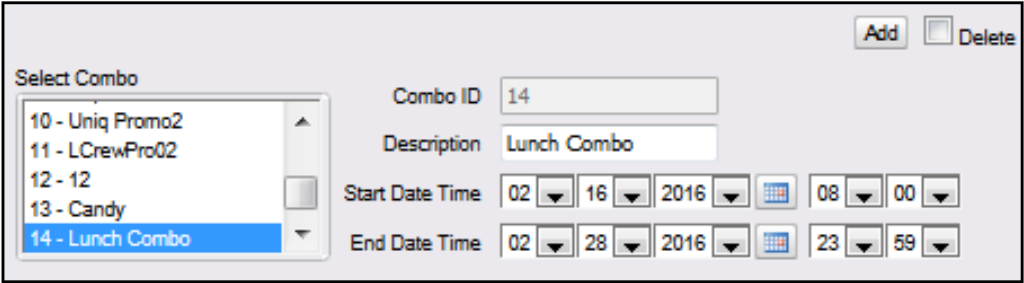 | Value | Description |
| --------------- | ------------------------------------------------------------------------------------------------- |
| Combo | Define promotions that allow items from two or more item lists to be setup to trigger a discount. |
| Combo ID | Sets the ID used to identify and locate the appropriate Combo Deal. |
| Description | Enter an accurate description for the promotion. |
| Start Date Time | Sets the date and time the promotion starts. |
| End Date Time | Sets the date and time the promotion ends. |
{% hint style="info" %}
An appropriate Combo description should be used as it will appear on the receipt (i.e. Lunch Combo).
{% endhint %}
{% hint style="info" %}
The system allows a promotion with a start date less than its end date. Such a promotion is seen by the system as "inactive." This is advantageous when the same promotion runs for a month and then again several months later. Times are entered in 24 hour format.
{% endhint %}
{% hint style="info" %}
Combos are date and time sensitive. The dates and times drive when the discount applies.
{% endhint %}
{% endstep %}
{% step %}
Configure Week day Availablity
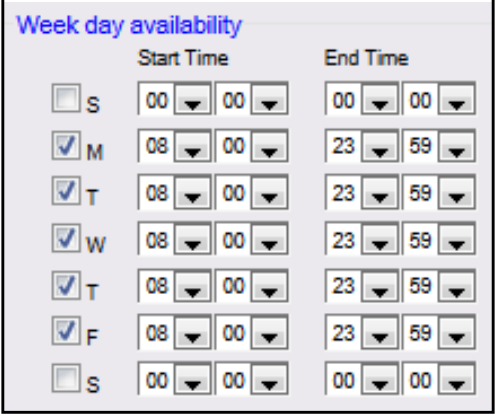 | Value | Description |
| --------------------- | ----------------------------------------------------------------------- |
| Week Day Availability | Allows a discount to run within certain days and times during the week. |
| SMTWTFS | Sets the week days of the promotion. |
| Start Time | Sets the begin time of the promotion. |
| End Time | Sets the stop time of the promotion. |
| {% endstep %} | |
{% step %}
Configure the Price By parameters
 | Value | Description |
| --------------------------------------------------------------------------------------------- | ------------------------------------------------------------- |
| Price By | Sets the pricing option. |
| Combo | Sets the price for the Combo as a whole. |
| This option should be used when the price of the items purchased together is always the same. | |
| Combo Items | Allows the discount to be configured based on the item lists. |
| {% endstep %} | |
| {% endstepper %} | |
## Assigning Price by Combo
{% stepper %}
{% step %}
Select Combo as the Price by parameter
 {% endstep %}
{% step %}
Select the Combo Priority
{% endstep %}
{% step %}
Enter the Combo Price
{% endstep %}
{% step %}
Select the Combo Pricing Scheme
| Value | Description |
| -------------- | ------------------------------------------------------------------------------------------------------------------------------------------------------------------------------------------------------------------------------------------------------------------------------------------------------------------------------------------------------------------------------------------------------------------------------------------------------------------------------------------------------------------------------------------------------------------------------------------------------------------------------------------ |
| Combo | Sets the price for the Combo as a whole. |
| Priority | Allows certain promotions to take precedence over others that may share the same items (i.e. two different discounts, same item list). |
| Price | Sets the discounted price of the Combo. Priority of promotions is particularly useful when programs give discounts as more items are added in combination. For example: Promo1 - Discount for soda and chips (priority = low) Promo2 - Discount for soda, chips, and sandwich (priority = medium) Promo3 - Discount for soda, chips, sandwich, and salad (priority = high) Without the ability to set priority, promo 2 and 3 will never be realized, as the soda and chips will always form Promo1. The Default setting is medium. Any promotion that does not specifically identify the priority will be assumed "medium" by the system. |
| Pricing Scheme | Determines how the discount appears on the receipt. |
| Weighted | Based on the price of the items. |
| Percentage | Based on the percentage discount field. The total percentage of all items should equal 100%. |
| {% endstep %} | |
{% step %}
Add the item lists
Select \[Edit] to add the Item Lists to be included in the Combo Deal.
1. Select all the \

 1. Select all the \
 | Value | Description |
| ------------------ | ------------------------------------------------------------------------------------------------ |
| Combo Item List | Allows the discount to be configured based on the item lists. |
| Item List Quantity | Determines the number of items that must be purchased from the list to qualify for the discount. |
| New Price | Assigns a new price to the items in the list for the Combo. |
| {% endstep %} | |
{% step %}
Select the Item Pricing option
Select the \


