> For the complete documentation index, see [llms.txt](https://docs.verifone.com/llms.txt). Markdown versions of documentation pages are available by appending `.md` to page URLs; this page is available as [Markdown](https://docs.verifone.com/hardware-products/hardware/engage-devices/m4xx-series/m424/m424-privacy-shield-installation-guide.md).
# M424 Privacy Shield Installation Guide
The M424 and M440 privacy shield safeguards the customer's PIN entry, keeping it confidential and hidden from the cashier or any other onlookers.
Before you begin, confirm you have all devices, cables, and accessories listed below.
## What's in the Box
## Quick Setup Guide
{% stepper %}
{% step %}
### Install the Privacy Shield
{% stepper %}
{% step %}
#### Brush off dust and debris
Brush any loose dust or debris off the front of the device, particularly around the keypad.
{% endstep %}
{% step %}
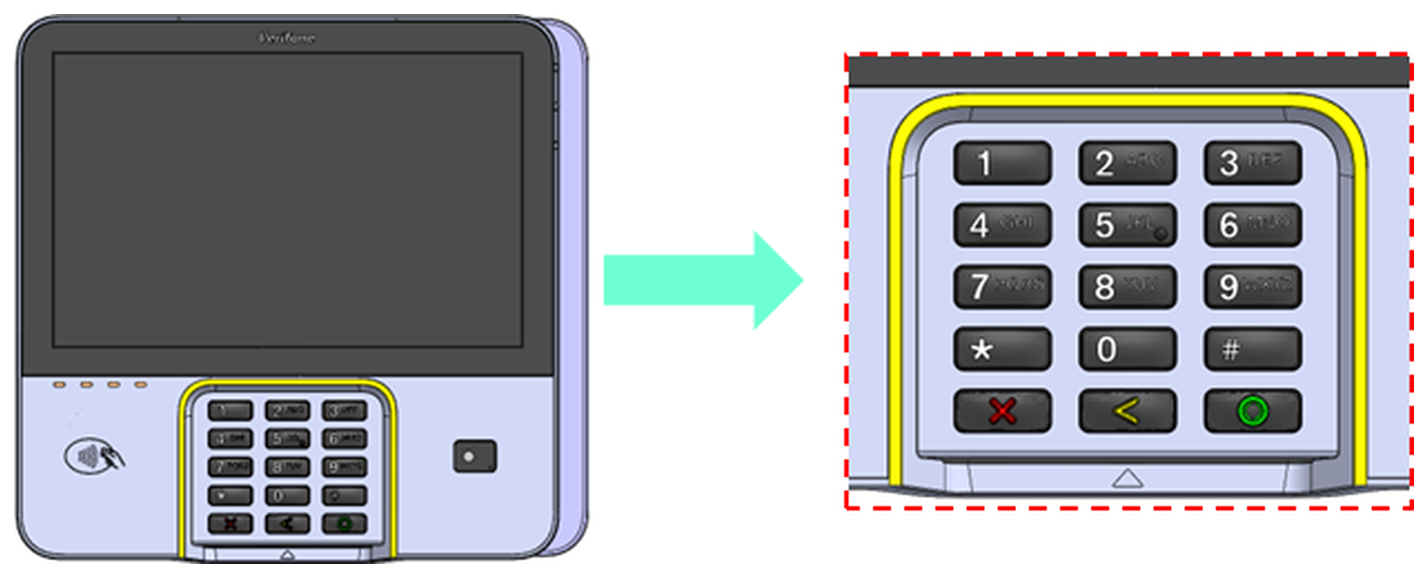
#### Clean the yellow surface
Clean the yellow surface framing the keypad with an alcohol cleansing pad, and let it dry before you continue.
{% endstep %}
{% step %}
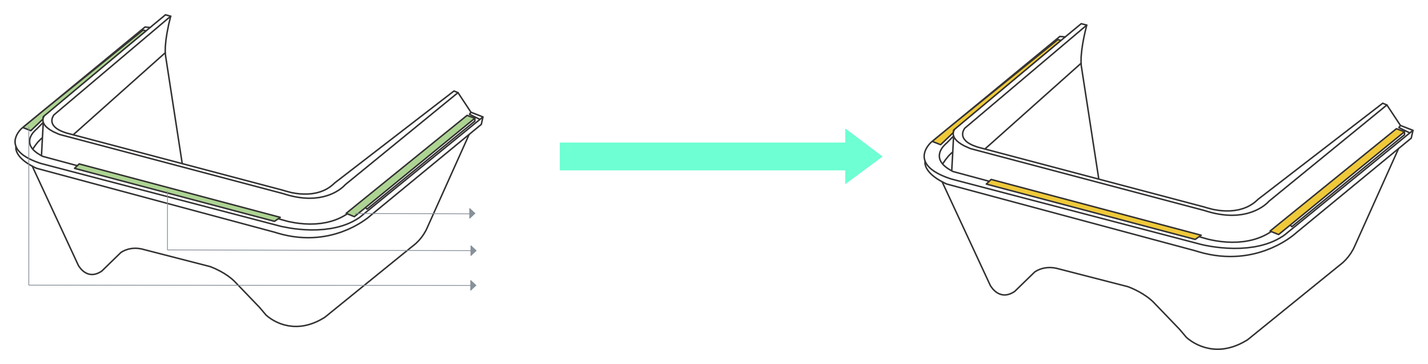
#### Remove the three liners
Peel off all three adhesive liners from the underside of the privacy shield to expose the adhesive strips.
{% endstep %}
{% step %}
#### Align the shield and press it down
Align the privacy shield with the device so that it sits straight along the top. Once aligned, press down on the top edge of the shield for ten seconds, then press down on the left and right sides.
{% endstep %}
{% endstepper %}
{% endstep %}
{% step %}
### Replace the Privacy Shield
Replace the shield if it comes loose or falls off.
{% stepper %}
{% step %}
#### Remove the old shield
Lift the existing privacy shield away from the device, making sure none of it is left attached.
{% endstep %}
{% step %}
#### Clean the mounting area
Use alcohol pads to clean the entire area and make sure no adhesive residue is left from the previous shield.
{% endstep %}
{% step %}
#### Fit a new shield
Follow the installation steps above to fit a new privacy shield.
{% endstep %}
{% endstepper %}
{% endstep %}
{% endstepper %}
{% hint style="info" %}
Order replacement shields by part number **PPL379-014-01-A**. In the USA, contact the Verifone Customer Development Center on 1-800-837-4366, Monday to Friday, 7 A.M. to 8 P.M. Eastern time. Elsewhere, contact your Verifone representative.
{% endhint %}
## Full Installation Guide
For full device setup details, product information, and troubleshooting steps, refer to the [M424 Installation Guide](/hardware-products/hardware/engage-devices/m4xx-series/m424/m424-installation-guide.md) (DOC379-013-EN-A).
---
# Agent Instructions
This documentation is published with GitBook. GitBook is the documentation platform designed so that both humans and AI agents can read, navigate, and reason over technical content effectively. Learn more at gitbook.com.
## Querying This Documentation
If you need additional information that is not directly available in this page, you can query the documentation dynamically by asking a question.
Perform an HTTP GET request on the current page URL with the `ask` query parameter, and the optional `goal` query parameter:
```
GET https://docs.verifone.com/hardware-products/hardware/engage-devices/m4xx-series/m424/m424-privacy-shield-installation-guide.md?ask=&goal=
```
`ask` is the immediate question: it should be specific, self-contained, and written in natural language.
`goal` is optional and describes the broader end goal you are ultimately trying to accomplish on behalf of the user. GitBook uses it to tailor the answer towards what is most useful for that goal.
The response will contain a direct answer to the question and relevant excerpts and sources from the documentation.
Use this mechanism when the answer is not explicitly present in the current page, you need clarification or additional context, or you want to retrieve related documentation sections.